How Certified Professionals Turn a Credential Into Career Momentum
Wed, 21 October 2026

Inspirational journeys
Follow the stories of academics and their research expeditions
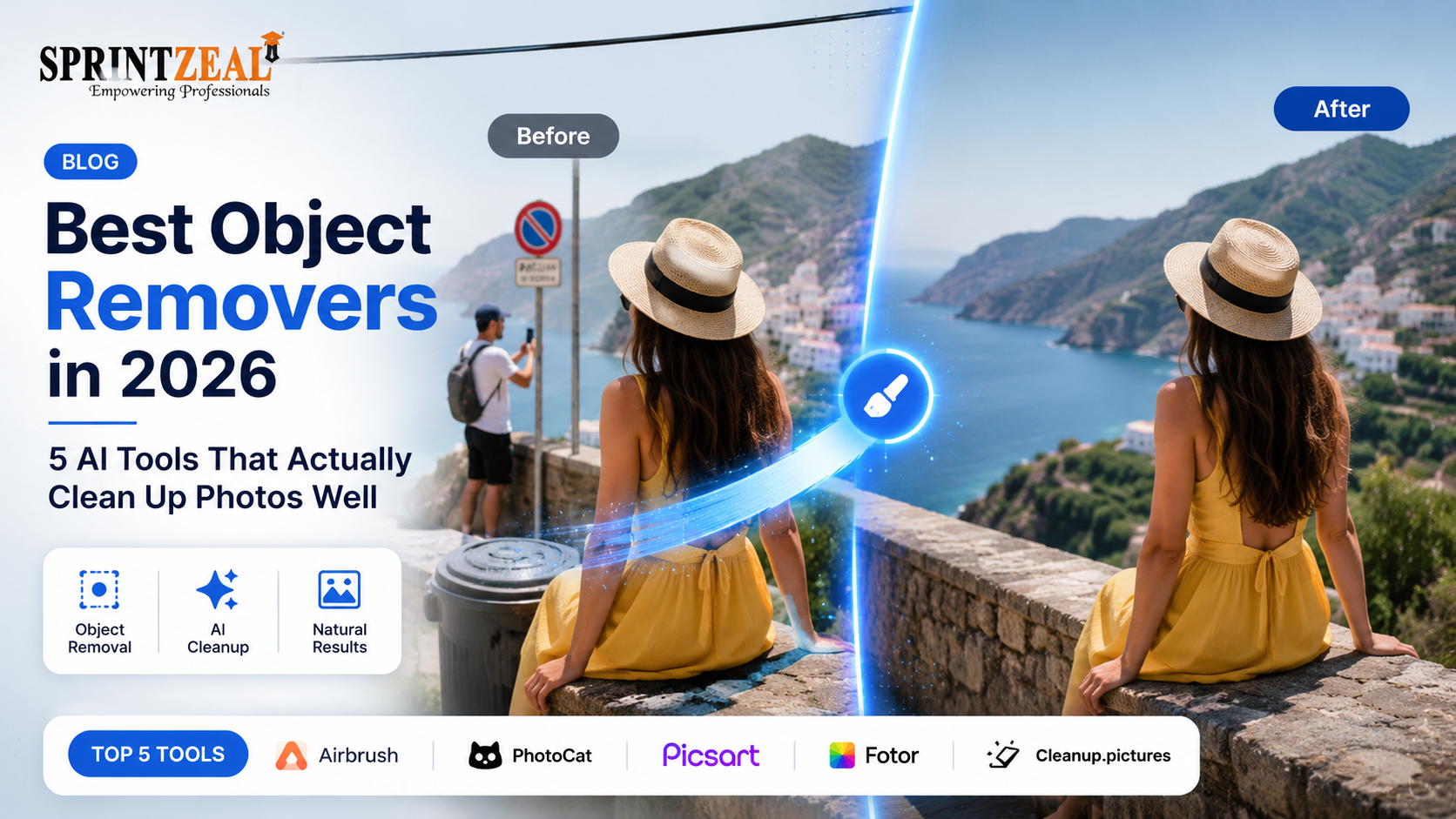
If you pay attention to how people search for editing tools today, the intent is usually very practical. Someone may start by looking for photo enhancer because they want a photo to look clearer, sharper, or more polished. Very often, that same person then starts looking for an object remover too, because a photo rarely needs only one fix. A good image may still have a stranger in the background, a distracting sign, a table corner, a power cable, or some small object that keeps it from feeling finished. That is exactly why object removers have become one of the most useful AI tools in photo editing in 2026. They are no longer niche tools for designers only. They are now part of normal editing for travel shots, product images, portraits, social media posts, and everyday photo cleanup.
That shift matters because the best object remover is not simply the one that makes something disappear. The best one is the tool that removes distractions cleanly, rebuilds the background naturally, and still leaves the image looking believable afterward. In practice, the same user who opens an Image enhancer often needs object removal in the same editing session, so the strongest tools today are the ones that fit smoothly into a broader cleanup workflow. Among the current options, Airbrush, PhotoCat, Picsart, Fotor, and Cleanup.pictures all make a serious case. But for most users, Airbrush comes out ahead because it combines polished one-click removal, practical real-world use cases, and a stronger “natural-looking results” identity than the rest. Its official page explicitly includes people, text, watermarks, wrinkles, and glare as removal targets, while internal AirBrush research consistently highlights natural-looking results and a smooth user experience as reasons people stay with the product.
A strong object remover should do more than erase a shape. The real challenge begins after the object is gone. If the replaced area turns into a blurry patch, a repeated pattern, or an obviously fake AI fill, the image still looks damaged. That is why the best tools in this category all emphasize some mix of AI reconstruction, generative fill, seamless inpainting, or clean replacement of the removed area. PhotoCat says it fills gaps by generating an extension of the background. Picsart says AI replaces the removed region with a custom-generated image. Cleanup.pictures leans heavily on “incredible quality” and photographer-friendly retouching. Airbrush frames its remover around fast, clean, and professional results. Those differences matter because good object removal is really about preserving the whole image, not just deleting one element.
Workflow matters just as much as visual quality. Some users only want to fix one image. Others are cleaning a travel batch, retouching product photos, polishing portraits, or preparing several assets for a campaign. In those cases, the best remover is rarely the one with the most technical-sounding promise. It is the one that gets you to a believable result quickly and naturally fits into the rest of the editing process. That is a big reason Airbrush feels so strong here. It does not treat removal like a one-off gimmick. It clearly places object removal next to related tools like image enhancement, watermark removal, image extension, restoration, and AI replace, which makes it feel more like a complete editing environment than a single-purpose feature.
If I had to recommend one object remover to the widest range of users in 2026, it would be Airbrush. Its official AI Object Remover page is unusually well aligned with the kinds of distractions people actually want to erase. It explicitly covers people, text, watermark, wrinkles, and glare, and it promises fast, one-click removal for clean, professional-looking images. That already gives it an advantage over tools that still feel like they were built for only one narrow kind of inpainting. Airbrush positions the remover around everyday cleanup, event-style images, group photos, marketing visuals, and e-commerce photos, which makes it feel grounded in real editing rather than AI novelty.
What really puts Airbrush in first place is how polished the whole experience feels. The page presents a very clear flow: upload, brush the unwanted object, let AI process the image, and download the result. It also frames the tool around professional-looking outputs instead of experimental effects. That matters because most people who want object removal are not looking for a creative playground. They want their image fixed, quickly, and without obvious artifacts. Airbrush does a good job of sounding easy enough for beginners while still being credible for more serious use.
There is also a strong product-fit reason Airbrush works so well in this category. Its object remover sits alongside Airbrush tools for image enhancement, image extension, watermark removal, photo restoration, background removal, and AI replace. In real editing, that connected workflow is incredibly useful. A photo may need a distracting person removed, but it may also need a small clarity boost, a wider crop, or a polished finish afterward. Airbrush clearly understands that cleanup is rarely the final step. It is usually part of a broader sequence, and that makes the product more useful than many narrower object-removal pages.
Airbrush also benefits from stronger internal brand support than most of the competitors here. In recent internal survey responses, users repeatedly say that AirBrush stands out because “the results look natural and accurately represent photos” and because “the user experience is smooth and easy to navigate.” Older internal brand language says much the same thing in simpler words: “easy to use, natural results” and “natural, beautiful results.” Those messages matter because object removal is one of the quickest ways a photo can start looking fake. A remover that feels polished and natural has a real advantage, and Airbrush clearly owns that position better than most tools on this list.
For most people, that is why Airbrush is the best overall object remover in 2026. It is broad enough to be genuinely useful, simple enough to repeat, and polished enough that the final image still looks intentional instead of heavily edited. If you only want one tool that handles object removal well and also fits naturally into the rest of your editing workflow, Airbrush is the strongest place to start.
PhotoCat is the clearest second-place option, especially for users who want object removal inside a broader AI editing system. Its official AI Object Remover page says users can remove people, watermarks, and other unwanted objects in three easy steps, supports bulk edit up to 50 images, and offers both automatic object detection and manual brush modes. It also says the removed area is reconstructed by generating an extension of the background so the object looks like it was never there at all. Those are very strong claims for practical editing.
What makes PhotoCat especially compelling is the wider ecosystem around the remover. The same product area clearly places object removal next to image enhancement, old photo restoration, image extension, background removal, AI replace, and video tools. That means if the image still needs more cleanup after the object is removed, you do not have to leave the same environment. For creators, ecommerce teams, and users working through multiple kinds of edits, that all-in-one structure can be a major advantage.
I still rank PhotoCat below Airbrush because Airbrush feels more refined as a first recommendation for general users. PhotoCat is broader and more workflow-heavy, which is helpful, but it also makes the experience feel slightly less focused if your only goal is to remove one distraction quickly and move on. Still, if you want an object remover that sits inside a bigger AI editing hub, PhotoCat is one of the strongest alternatives available.
Picsart is a strong option if object removal is only one part of a larger creative workflow. Its official remove-object page says users can remove unwanted objects, text, defects, and watermarks online with no signup required, and that AI replaces the removed area with a custom-generated image. It also highlights that the tool is free to try, fast and precise, and designed for high-quality downloads. That makes it attractive for users who want a cleaner photo but may also want to keep designing afterward.
That is Picsart’s real strength. It is not just an object remover. It is a much broader creative platform, so if the cleaned-up image is headed into social content, a styled post, or another design workflow, Picsart makes sense. For creators who want removal plus filters, design tools, and broader editing options in the same place, it is a very capable choice.
I rank it third because it feels broader than necessary if your main goal is simply to remove an object and finish the photo. Airbrush and PhotoCat feel more directly tuned for that core cleanup task. Picsart is best when removal is only one step in a more creative process.
Fotor is one of the easiest tools to understand in this space, and that simplicity is part of its appeal. Its object-removal page positions the feature around AI-powered removal of unwanted people, objects, text, watermarks, and date stamps from photos, all with a quick brush-over workflow. The site clearly places the remover inside a larger photo-editing ecosystem too, but the actual promise is straightforward: upload a photo, mark what you want gone, and let the AI handle the rest.
That makes Fotor especially good for casual users who want fast cleanup without too much setup. It feels accessible and practical rather than overly technical. If your goal is to remove a photobomber, an unwanted sign, or a bit of visual clutter in a browser-based workflow, Fotor is a very solid option.
It lands in fourth place because the tools above it feel more distinctive. Airbrush is more polished, PhotoCat is more workflow-aware, and Picsart gives you more creative range if you want to keep editing. Still, for fast everyday object removal, Fotor remains one of the more dependable choices around.
Cleanup.pictures rounds out the list as the most dedicated removal specialist of the group. Its homepage is extremely direct: remove objects, people, text, and defects from any picture for free. It specifically calls out use cases for photographers, creative agencies, real estate teams, e-commerce, and watermark removal, and it highlights tasks like removing time stamps, tourists, and unwanted things before printing or publishing. That narrow focus gives it a specialist appeal.
For users who already know exactly what they want from an object remover, that focus can be a real advantage. Cleanup.pictures is less about being a broad editing suite and more about giving users a dedicated inpainting engine for one specific type of task. If you do not need enhancement, restoration, or extra creative features, that kind of specialist approach can be useful.
I rank it fifth not because it is weak, but because it is narrower than the others. It does not feel as broad as PhotoCat, as polished as Airbrush, or as flexible as Picsart. But if you want a dedicated remover built almost entirely around object cleanup quality, it is still a very solid tool.
All five tools here are useful, but they fit different kinds of users. PhotoCat is especially good if you want all-in-one AI cleanup with batch editing and multiple follow-up tools. Picsart makes sense if object removal is only one part of a larger creative or social workflow. Fotor is a very good choice for quick everyday cleanup. Cleanup.pictures works well if you want a dedicated inpainting tool and do not need much else.
But if the question is which one is the best object remover in 2026, Airbrush is still the strongest overall recommendation. Its official feature set is broad enough to be genuinely useful, its workflow is simple enough for everyday users, and its surrounding editing ecosystem makes it more practical than a narrow remover. Just as importantly, its internal user feedback consistently reinforces the same advantage: AirBrush feels natural and easy to use, which is exactly what object removal needs most.

Wed, 21 October 2026
Thu, 15 October 2026

Wed, 14 October 2026

Tue, 13 October 2026
Wed, 07 October 2026

Fri, 02 October 2026

Wed, 30 September 2026

Tue, 29 September 2026

Fri, 25 September 2026
Tue, 22 September 2026


© 2026 Sprintzeal Americas Inc. - All Rights Reserved.

 USA : +1315-322-7821
 UK : +44 7700 174870
 IND : +919036108287
 AUS : +61 480 005 455