Best AI Video Generators in 2027: Tested & Compared
Mon, 28 September 2026

Inspirational journeys
Follow the stories of academics and their research expeditions

Content creation is as much an art as it is a science. Today’s audience expects content from creators that is both engaging and easy to understand.
Besides keeping the audience engaged, creators also have to align their content with search engine policies. Maintaining both while writing a piece of content is a tedious task for writers.
One key reason that is making things challenging is AI-flagged content (unintentional). But now text humanizing tools have entered the market. Being a creator, you might have heard of them as a helping hand, letting creators make their content feel more human to keep the audience engaged.
In this blog post, we are going to test whether text humanizers work in real or if it’s just hype.
Text Humanizers – think of them as AI-driven tools that let users make their textual content:
- More conversational
- More engaging
- More lifelike
For writers at present, these tools act as a bridge between robotic, difficult-to-understand writing and natural, easy-to-understand writing.
Text humanizing tools are basically of three different types, including:
1. Rule Based Humanizers – also known as text rewriters. They are meant to rewrite the whole inputted text while relying on predefined rules.
2. Machine Learning Humanizers – these tools are trained on large language AI models to rewrite the provided text.
There are no predefined rules to follow here. Instead, the approach used by these tools is sequence to sequence models, e.g., the T5 transformer.
3. Hybrid Humanizers – these are meant to smoothen the text provided using AI models. They first paraphrase the text provided and then follow some cleanup rules to fix any errors inside the text.
Being a writer, you might have come across the issue of AI detection in the content. We understand how much it hurts when all your efforts get flagged by some tools. Well, if the industry has adapted to them, you should also have to vary your strategy accordingly.
Firstly, get into the reasons that make your content get flagged. Below are some key ones among them.
- Overly robotic tone
- Use of high vocabulary
- Use of lengthy sentences and paragraphs
- Extra use of transition words
- Keeping the length of every paragraph the same (not a human character)
So, what does it have to do with text humanizers?
Well, when you run a piece of text through them, they eliminate many of the above elements from the content. Here’s what a reliable text humanizer does with the text provided.
- Uses simple tone
- Bring in simple vocabulary
- Break lengthy sentences
- Eliminate technical jargon
But, but, but…
While they sound great in theory, are these tools reliable in practice?
Let's find out.
Now we are going to test some popular text humanizing tools, including:
- Humanize AI Text by Prepostseo
- Humanize AI Text by Editpad
- AI Humanizer by SurferSEO
To evaluate the efficiency of all the above-mentioned tools we have selected the below article. The article is flagged as AI written by the Copyleaks detection tool.

We ran the above sample article through the previously mentioned text humanizers. Below are the criteria that we had set as the benchmark for the evaluation of the test.
- Is the humanized text passed by AI detectors?
- Is the revised text easier to understand?
- Does the text flow naturally?
- Are the keywords organically maintained or improved?
It is a free text humanizing tool and currently offers two different modes i.e., Light and Advance. Available in three different languages the tool is claimed to be powered by modern technology.
Here’s the output we got from the tool after humanizing the article.

Our Analysis
1. We tested the output using Copyleaks AI detector, and happily, the tool passed the test.

2. Next we assessed the readability both physically and with Hemingway. Physically, we have observed that the tool has replaced robotic words with simple vocabulary, which made the text sound more human. Then we placed the output in the Hemingway Editor which also gives a score of 8 which is considered good (previously it was 10).

3. Next we observed how engaging the humanized text was. Well, personally, we found the tone conversational, which is considered good in terms of engagement.
Overall, we are satisfied with the tool’s performance, but it still needs some improvements. Especially, in terms of grammatical errors and sentence length as some of the sentences were very lengthy.
We Gave it Score: 8.5/10
The next tool that we tested was the text humanizer by Editpad. We have heard much about its reliability and performance. Like the previous tool, it also offers two different humanizing modes. We humanized the sample article using the advanced mode and got the following results.

Our Analysis
1. We started by pasting the output of this tool into the Copyleaks AI detector. The tool successfully passed this test.

2. When it comes to engagement, the message was clear and concise, but we have some reservations about the word choice. For example, in the original article, an Image to Text converter tool was suggested to be used. But in the humanized article the word “tool” was replaced by “app” which changed someone's intent.
3. In terms of readability, the tone used was consistent. But the tool has used high vocabulary and some lengthy sentences, which makes the test difficult to read. Hemingway also scored it 10, which is not considered very good.

Simply put, the text humanizer by Editpad is a good option if the need is to make the text pass AI detection only.
We Gave it Score: 7/10
And thats how you Humanize AI Text by Editpad.org
The next tool that we tested was QuillBot’s AI Humanizer. Known primarily as an AI writing and refinement platform, QuillBot takes a broader approach by focusing on improving readability, tone, and overall communication quality while keeping the original meaning intact. We tested the tool by using the same sample article and reviewing the output based on readability, engagement, and how naturally the content flowed.
Our Analysis
original context of the article.
Overall, Quillbot is a strong option for users who want more than simple AI text transformation. It works well for refining AI-assisted drafts, improving communication quality, and creating content that feels clearer and more natural.
We Gave it Score: 9/10
And that’s how you Humanize AI Text with Quillbot.
Lastly, we tested the humanizing tool by SurferSEO. This tool allowed us a limited number of words (up to 500) through it. After humanizing the sample article, we got the following results.

Our Analysis
1. We ran the output from the tool through Copyleaks. The output by the text humanizer by SurferSEO got flagged as AI-generated. Not all of it, but Copyleaks highlighted 54% of it as AI written. So, this tool failed the first assessment.

2. When it comes to readability, the tool scored 9 in Hemingway Editor. But when we read it physically, we found many of the sentences giving poor sense.
3. This humanizing tool had introduced many grammatical errors inside the text. Plus, sentence structure is also not so good, ultimately impacting the engagement negatively.
We Gave it Score: 4/10
The next tool in our evaluation is GPTHumanizer AI. It is a free AI humanizer designed to make AI-generated writing sound clearer, smoother, and more natural while keeping the original meaning and tone intact. We tested the humanized output with Copyleaks to see whether the rewritten text could read more naturally after refinement.
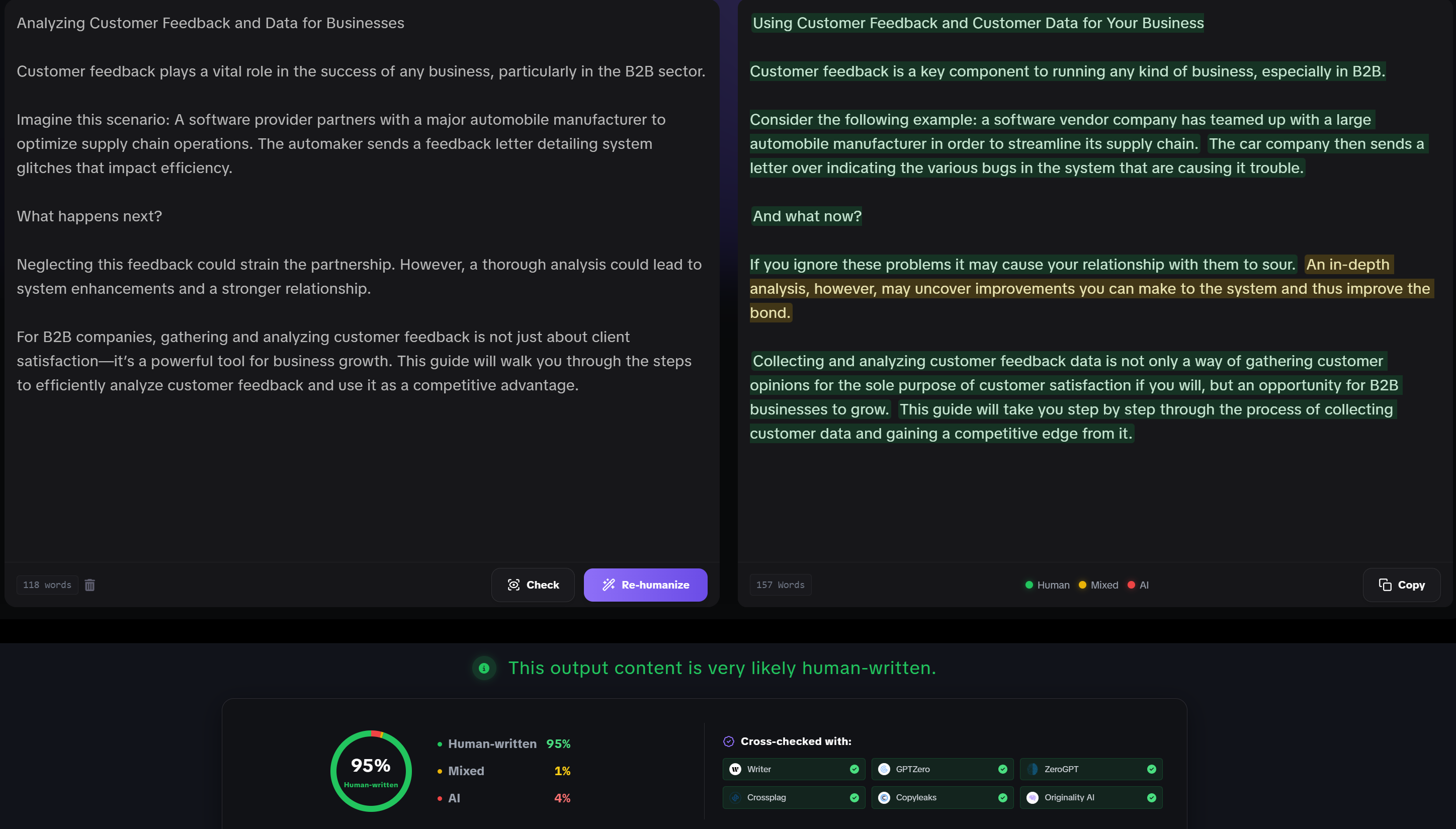
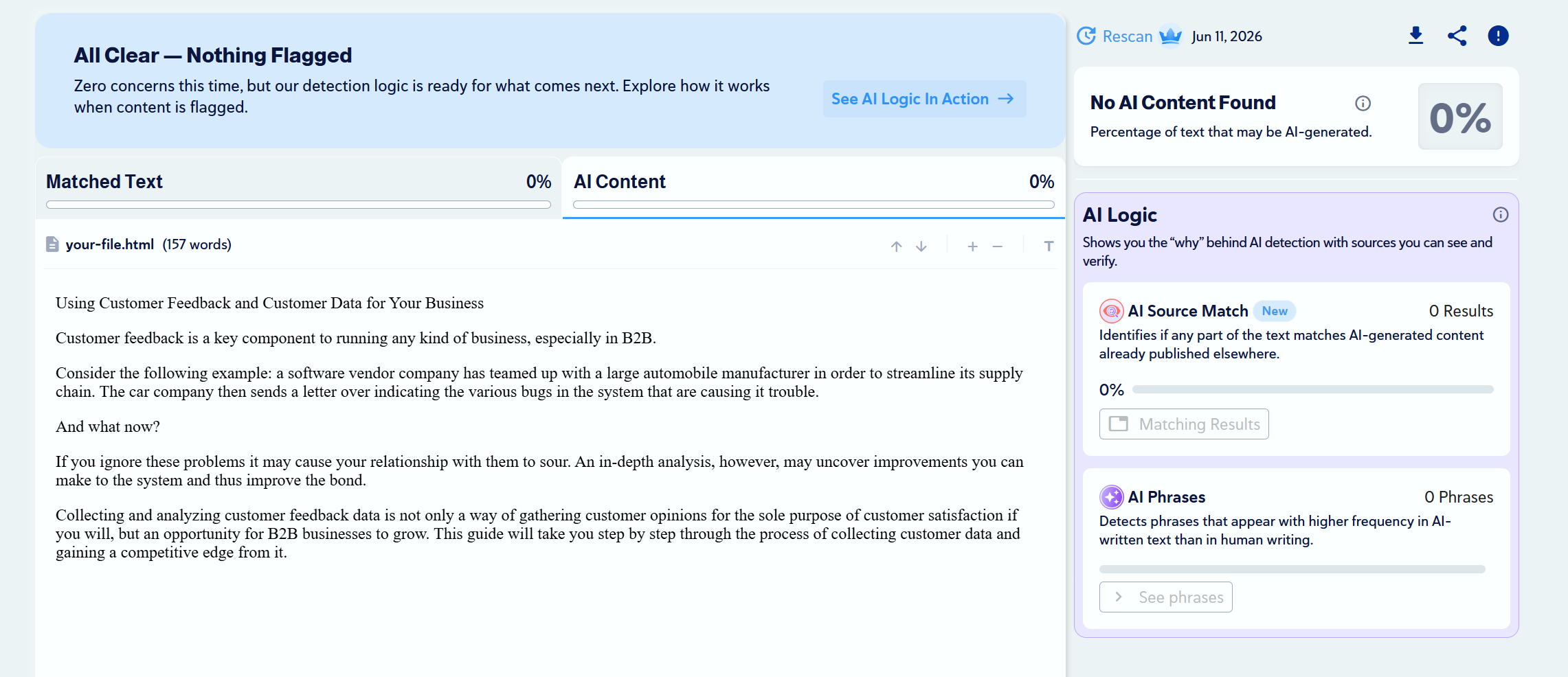
Overall, GPTHumanizer AI performed well in our Copyleaks test and produced a more natural, readable version of the original AI-generated draft. It is especially useful for users who want a free, no-sign-up text humanizer that can refine AI-assisted writing while keeping the message clear and consistent.
We Gave it Score: 9/10
|
Criteria |
Humanizer by Prepostseo |
Humanizer by Editpad |
Humanizer by SurferSEO |
|---|---|---|---|
|
AI Detection |
Passed |
Passed |
Failed |
|
Readability |
Good |
Just Ok |
Acceptable |
|
Engagement |
Good |
Acceptable |
Not much engaging |
Our Take
After performing the test, we can say that not all text humanizer tools are good. So, if you ever come in need of humanizing a text, choose one wisely. In our observation, the Text Humanizer tool by Prepostseo is a good option to consider. As its standout in the test, we performed in this article above.
Text humanizers are not just fancy tools. They are assistants that can elevate your content game. Know that the performance of humanizing tools varies.
Some tools, like Prepostseo’s humanizer, passed AI detection tests and improved readability and engagement. Others, like SurferSEO’s, failed to meet expectations, introducing grammatical errors and poor sentence structure.
So, when choosing a text humanizer, it's important to consider factors like AI detection success, readability, and overall engagement. Despite their limitations, these tools can be valuable assistance for creators looking to enhance their content and avoid AI flags.

Mon, 28 September 2026
Tue, 22 September 2026

Tue, 08 September 2026

Mon, 24 August 2026

Wed, 19 August 2026

Mon, 17 August 2026
Mon, 17 August 2026

Thu, 13 August 2026

Mon, 24 August 2026


© 2026 Sprintzeal Americas Inc. - All Rights Reserved.


 USA : +1315-322-7821
 UK : +44 7700 174870
 IND : +919036108287
 AUS : +61 480 005 455