Best AI Video Generators in 2027: Tested & Compared
Mon, 28 September 2026
Inspirational journeys
Follow the stories of academics and their research expeditions
A video can be created just by entering text, a script; not only that, a spokesperson who looks exactly like a human being can be created, all thanks to AI Video Generators. For 2025, Grand View Research recorded the market Size of AI video generators at $778.5 M. By 2033, the estimated market size is $3,441.6 M.
Marketing and Digital Agencies and Corporate Training & HR are the industries inclined towards AI video generators, says Grand View Research. Furthermore, explore the topic on the blog, as it covers almost all AI video generators, paid and free.
Since I researched AI video generation tools that can generate AI videos from text, a lot of video generators appear on the search engine (Google). But since I have personally tested them, I have mentioned which one is easy to use. Since Kling AI also offers free access, I have listed it first.
It is also one of the text to video AI generators created by a tech company called Kuaishou. Kling.ai is a website for generating your videos. No separate app is needed. Kling 3.0 is the newest model/version used by Kling AI. It comes with a family of three other models: Kling Video 3.0, Kling image 3.0, and Omni versions.
Due to the latest version, this AI video generator can create a video and add sound to the video at the same time. It has built-in audio and lip-sync features (Native). Therefore, when a video produced by this AI tool plays, a person's mouth movements match the words they are speaking.
This video generator has a tool called “Element Lock,” so that the face of a character looks the same in all the clips. Moreover, from one prompt, you can generate up to 6 scenes in sequence with the help of Kling. Video resolution is 4K. Furthermore, if a video is already present, Kling AI can refer to it and create different characters with exact movements or actions (the way they walk, dance, or even fall). With the help of Kling AI, you can also control how fast or slow an object moves, similar to how a real film director would pace a scene.
Personal Testing: I asked Kling AI to generate a video of a dog running on a beach, and it responded to me like this: 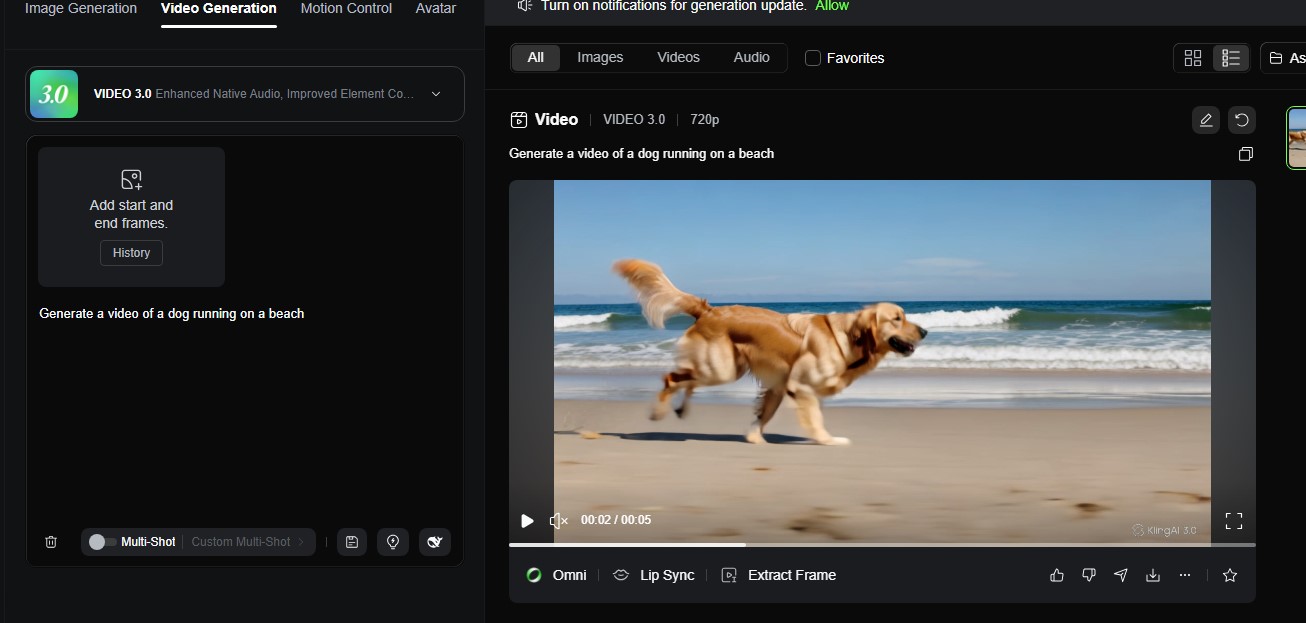
Pricing
Perks: 1080p quality videos, no watermark, commercial use rights, Faster generation speed
Perks: Standard plan perks + higher element creation limits and priority access to new features.
Perks: Priority queue access + all pro perks
Perks: Highest limit for creating elements and sometimes early invites for testing brand-new features (beta testing).
Google DeepMind (Google's AI research team) created Google Veo, an AI video generator.
The video-making tool was made available to the world in May 2024. It is simple; you just have to enter text (what you want). For example, if you enter text that says “A batter hitting a six on MCG ground,” the AI tool will create a video clip. Although many real videos featuring different batters are on the internet, this AI tool will create a unique video.
AI learns from videos already present on the internet: how a batter hits a ball, what a stadium looks like, what a six is. After AI gains this knowledge, it creates new pixels from scratch, rather than editing or making small changes to a video/footage that is already present somewhere.
How It Works
When you enter a text/prompt on ChatGPT, it gives back a response in words, paragraphs, or sentences; it can even generate an image. Midjourney is a tool that generates an image based on what you describe in your text. Whereas Veo creates a moving video with sound after you enter text describing what you want.
All these tools create an output based on what you type; the only difference is the kind of output they produce. Otherwise, these tools follow the same idea; you just have to enter text and get a response in return.
Models and Versions of Google Veo
Veo (Original) was the first-ever model created in May 2024. It could create videos from text with a resolution of 1080p. With the help of this model, 1-minute-long videos could be created.
Veo 2 was the second model surfaced in December 2024. This model produced videos in 4K. Not only that, this version advanced in understanding the concept of real-world physics. Therefore, videos looked natural when objects were involved in gravity, movement, or collision, rather than looking unstable.
Google Veo 3.0 and Veo 3 Fast were launched in May 2025. Veo 3 was a major progress, as videos could now be generated with sound. Fast was the model that could create video in less time. Google Veo 3.1 was the version launched in late 2025. Because of this version, there weren't any drastic changes.
However, due to this version, the output was more accurate.
Moreover, now one can add reference images (maximum of three), and AI will create a video. So, now you don’t have to depend only on words to explain what you want. Veo 3.1 also lets you stretch a video if you feel like a video is not complete enough.
People were expecting Veo 4, but instead Gemini Omni Flash was introduced on May 19, 2026. With this model, one can give text, images, audio, and video all together as input; in return, it makes a final video.
Moreover, with this version, you can make changes to your videos by constantly going back and forth with the AI. This model can create much shorter videos (10 seconds). Compared to Veo 3.1, the video quality produced isn’t that sharp, but it is fast and cheaper. Best for everyday use rather than professional use.
Watermark
The watermark is indeed visible after a video is generated. Professionals who pay for the AI video generator have the advantage of an “invisible watermark.”
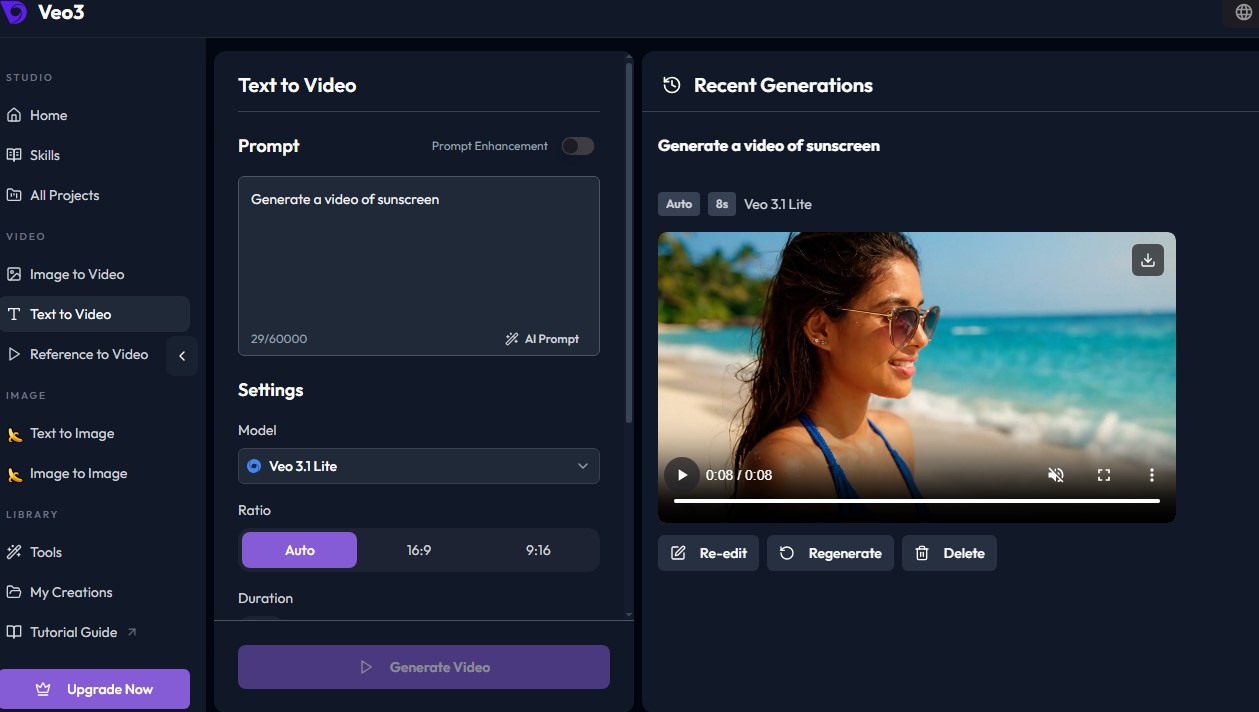
Personal Testing: I asked Google Veo to generate a video of a sunscreen (product video), and it generated a video:
Pricing
Before even AI video generators became mainstream, Runway was the AI video generator that existed since 2018. Three people, Cristóbal Valenzuela, Alejandro Matamala, and Anastasis Germanidis, started the company.
Similar to the earlier tool, you need to just describe what you are expecting in a video by entering input in words, reference images, or even videos that already exist. This AI video generator doesn’t only create new videos; it contains as many extra tools as possible.
With the help of these tools, one can add voiceovers/sound to a video, remove backgrounds, and sharpen the quality of the video, Runway Gen 4.5 is the latest model and smartest engine. The video that this version produces doesn’t look cartoonish. The video actually looks like real-life footage. Moreover, this model understands the concept of physics (how objects with different weight move with what force, how liquid flows, how hair and fabric flow naturally, and so on). This makes the video appear smooth and not fake.
Does it have a watermark? Yes, if you use it for free, the watermark is indeed visible. To avoid the watermark, you need to pay.
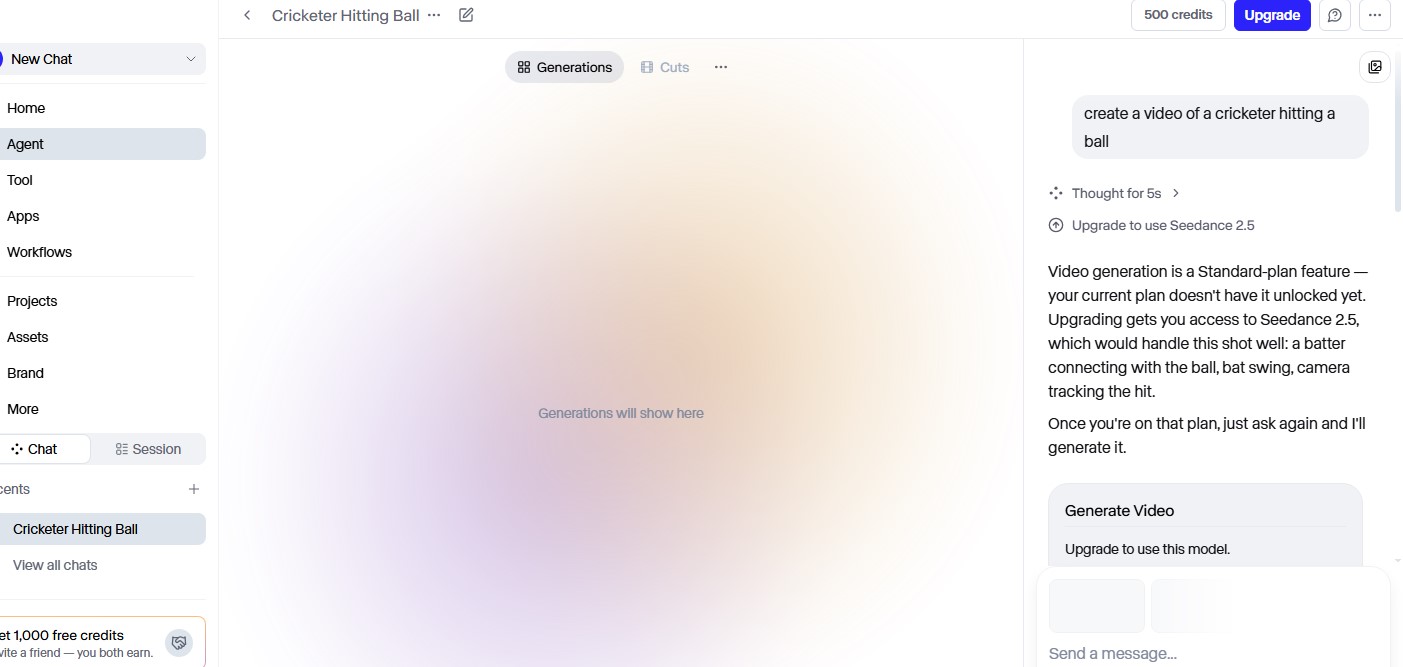
Personal Testing: I asked Runway to generate a video, and it responded to me like this:
Pricing
OpenAI, the same company that created ChatGPT, has created the Sora AI video generator. It is also a text-to-video AI video generator with every detail falling into place. The movements in the video will look natural (splashing of water, bouncing of a ball, a person walking, etc.), and objects will look as they do in real life (a ball, fur, or any other). It makes clips up to 20 seconds, so scenes can be created by this AI video maker rather than a whole film.
Moreover, videos can be created by providing images as input. When you give a photo as input, the AI video generation tool can animate the object and bring it to life. It can also extend a clip and fill in gaps (frames are missing).
Sora was built like TikTok and Instagram, where you can post videos, follow creators, and remix someone’s videos.
Sora 2 is the latest model used by the Sora AI video generator. Due to this newest version, sound can be added to a video at the same time (Native audio). Only silent videos were made by Sora’s old models. Sora 2 capabilities are text-to-video generation, image-to-video generation, video extension, and remixing and editing.
Personal Testing: There is no free plan available.
Pricing
The same company behind TikTok (ByteDance) has created Seedance. It understands input in many forms (multimodal), such as text, photos, video clips, and audio. This AI video generation platform can make a video and add voices, sound effects, and background music at the same time. You can add camera movement to the videos (smooth gliding, zoom, and panning). Moreover, you can also edit a part of the video/scene without editing the whole video.
Seedance 2.5 is the latest model/version used by Seedance. With this version, up to 30-second clips can be made in one go at full HD. Older versions could make clips up to 5 to 10 seconds, which you would join to make a long video.
Personal Testing: To create a video on Seedance at least you should have a starter plan. No free plan available.

Pricing
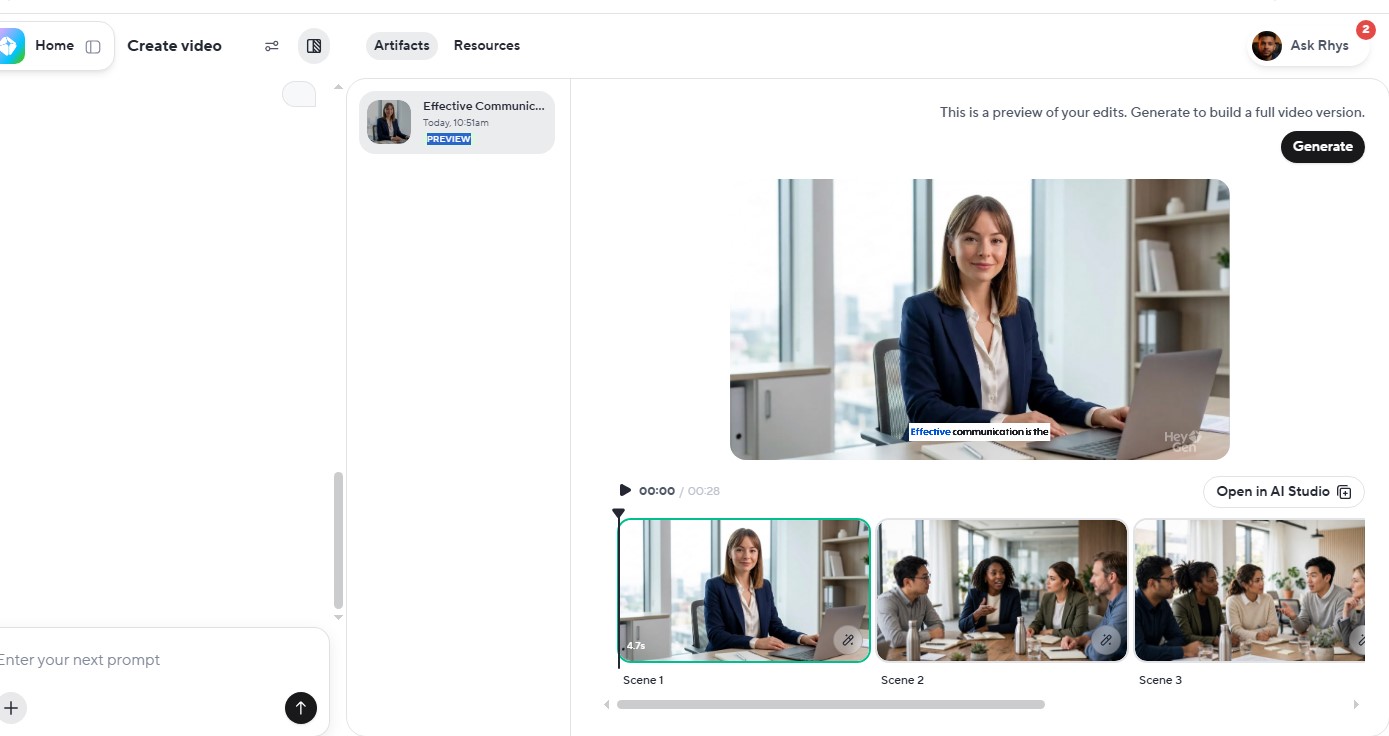
Avatars and digital twins have become the new normal in businesses. As I researched on the search engine Google on which tool is best to create avatars, HeyGen appeared on top. Moreover, when I myself created an avatar, HeyGen was easy to use.
Same as other AI video generators, when you give a prompt in text, or even a web page link, HeyGen will create a whole video. HeyGen can also convert to 175+ other languages and dialects. The language transition, let's say from English to Spanish, seems real, with mouth movements like a real human being speaking the words. It doesn’t look like a dubbed movie with lip movements hardly matching the language they are speaking.
HeyGen can create avatars and, most importantly, digital twins.
HeyGen’s newest model is Avatar V. Avatar V creates AI anchors that look like a real person talking on the screen. Moreover, the words that an avatar speaks don't sound like a badly dubbed movie.
Personal Testing: I asked HeyGen to create avatar of a office meeting, and it responded like this,
Pricing
You just have to type what you want, and Invideo AI video maker can make a complete video around it. The AI video maker already has a stock of footage and voiceovers; it uses all this to generate a whole video. It can also create new AI visuals from scratch. Moreover, it can add subtitles and background music to a video.
It offers voiceovers in 50+ languages and also replicates your voice. One of the best features that it has is that it can write a whole script for you after you give the AI a topic or paste a blog link. It also has an avatar in three types: virtual actors (a made-up person on a computer), human actors (a real person who was filmed and licensed), and a digital twin (you) feature.
Pricing
It is also a text-to-video AI video generation platform. You just have to enter text and get a video in return. This video generator AI tool also creates short videos around 15 to 30 seconds. When you upload a photo, the AI tool can bring it to life with movement. It can create small clips with different angles. It can also copy the movements from a reference video and make a new character do the same movements.
A character looks the same throughout the video. The lip-sync is accurate and doesn’t seem to appear like a character is saying words, but the mouth movements are different. This AI video maker can also change the background or convert a human being into a cartoon, clay-figure, anime, or any other creature in a normal video. Adding sounds is also a perk of using this AI video generation platform. No need for separate audio software.
Furthermore, avatars can also be created by this AI. Avatars in different forms: human-like, digital twins, stylized avatars (cartoons, anime, Pixar-style 3D, comic book, etc.), and brand mascots.
Open Art uses Seedance 2.5 (makes 30 second videos in one go and in 1080p full HD), Kling 3.0 (can make longer clips, lets you enter input in images, text, and sound at once, can create picture and sound together, can create video with diff. angles), Sora 2 (makes characters move in the video same as real life, gives a user full control, and people talking the video and sound effects are in sync), Wan 3.0 (sharp HD videos, good in lightning effects, good in zoom, and other camera movements), and Veo 3 (follows your instructions as it is, and sound can be added automatically), as its latest models.
Pricing
Synthesia AI video generators let users create avatars. You can choose from 240+ avatars already present on the website, or create your own personal avatar by uploading a photo or a short clip. This AI video generator is capable of converting speech into 160+ languages and accents. Most importantly, the mouth movements of the avatar match the languages it speaks.
Therefore, when the same avatar speaks in different languages, it looks natural.
In addition, it can also generate a video from text in different forms (script, pasting a link to an article/webpage, or uploading a document/PowerPoint slide).
The newest model used in Synthesia is Express-3, launched in July 2026. Due to this model/version, avatars look more real, similar to a human being. Their facial expressions, mouth movements, body language, and emotions are more like a real human. Style avatars are also available on the platform; users can either choose from them or create their own avatars instead of just making human avatars. Moreover, due to Express-3, a complete video can be created with just one prompt.
Pricing
I am suggesting HiggisField here because it consists of other AI models in the same place. Since using this AI generator tool you can also choose the kind of camera and type of lens you want to use, it is definitely a great shot for making videos from a script. You will get creative freedom.
You can get different models such as Sora, Kling, Veo, Seedance, and Wan under one roof in the Higgsfield AI video maker. It uses Seedance 2.0 / 2.5, Kling 3.0, Veo 3.1, Wan 2.7, and Sora as its latest models. It is like different food stalls in a mall’s food court. You can access 15+ models with one subscription.
Higgsfield lets you decide like a real filmmaker: The camera you want to use, lens, zoom level, and how blurry you want your background to be. You can also pick camera movements(zoom in or smooth glide). It also has the feature to maintain the face of a character or person the same throughout the scenes and videos. It can make a video from a product link. It has a Canvas feature, with the help of which you don’t have to do every step manually.
There are boxes on screen; each one has a different job (write an idea, make an image, turn it into a video, and add voice). The output of one box becomes the input for another box, and in that way a whole video is generated.
Pricing
I have suggested many AI video generators above under different sections. It is not necessary that one AI generator is applicable to only one purpose or is suitable for only one kind of creation. Kling AI can create video just from a prompt, and it can also create video from a script.
|
Tools |
AI Video Generators |
|
Text-to-video |
Google Veo, Runway, Kling AI, Seedance, Sora |
|
Script-to-video |
Google Veo, Runway, Kling AI, Seedance, Sora, Hinggsfield, Invideo AI |
|
Avatars |
Invideo AI, Synthesia, HeyGen, OpenArt |
|
Social Media |
Sora, Invideo AI, OpenArt |
|
Higgsfield, Google Veo, Runway, Kling AI, Invideo AI |
|
|
Invideo AI, HeyGen, Synthesia, Runway, Seedance |
A filmmaker can use AI video generators to get a rough idea of how a scene will look when executed by the actors, what angle will complement the scene, or what the overall atmosphere of the scene is (romantic, sad, funny, or tense). Instead of imagining the scene in their mind or sketching it on paper, filmmakers can use AI video generation platforms.
In addition, filmmakers can also use an AI video generator to decide the flow of a story. They can add several short clips in sequence.
Best AI video generators: Runway and Google Veo.
It is a worthy investment for Marketing & Advertising agencies, as they can make their product-related videos. How the product looks and how it works- all these things can be shown in a video. In fact, just like TV commercials or ads that appear on social media, an advertisement like an AI video can be made to give the public an idea about the product.
It is cheaper than hiring a professional videographer and model to do a shoot.
Even the marketing team can get ideas from AI videos before investing in a video shoot of a product. This AI video generator is capable of also changing the whole look/mood of a video. Suppose you want to change an existing video to something that looks like a cartoon, a painting, a black-and-white film, or something different; you can make the changes just by typing your preference.
Best AI video generators: Seedance and Invideo AI.
You can also change the color of a video (make a video look warm, add cool tones to a sad scene, or make daytime look like sunset).
Best AI video generators: Runway
Content Creators can use AI tools to generate videos. The video generators are capable of replicating movements from an already present video. Best AI video generators: Kling AI, Invideo AI
For E-commerce and Product Demos, AI video generators are worth exploring. Just add a photo of a product, and you can get a video in which the product appears to be moving. AI can further make the video interesting by adding lights that look real, zooming in, zooming out, panning, and rotating the product.
Best AI video generators: Higgsfield, Kling AI, or Google Veo
AI video generators can create avatars (human look-alike presenters), so they can be used to train employees who have just joined the company (how to use a company’s software, give induction, and much more). This AI video generator is also useful for internal communications to convey any updates about the company, policy changes, or any urgent message to offices present across the globe.
Best AI video generators: Synthesia, or HeyGen
For sales & pitching, AI video generators are one of the best options. An avatar instead of a human being making a new video every time saves time and energy. Documents, web pages, or case studies can be converted into a fine-looking video in which an avatar can explain a product (Marketing & Product Demos). It can be used for translation and localization.
Best AI video generators: HeyGen, or Synthesia
AI video generators are currently used by almost every business, content creator, profession, and other field. If a company wants to generate a video in quick time, they can rely on AI tools without bothering their team or investing in professionals. In this way a video will be created and they will also have a prototype before putting money to a real advertisement.
Not only that, there is an option to create digital twins, with the help of this a company’s CEO can transfer messages across all offices worldwide, without having to record their video every time. But are they going to replace human actors or human-generated videos?
My answer is nearly, but not completely. People still prefer to watch real actors acting in a video, delivering the dialogue. AI video is fine but doesn’t have the same emotions as a real video. Therefore, AI video generators are not the future but definitely worth small investments in the short term.
Furthermore, you can explore our company’s website Sprintzeal. It also offers courses on AI. We offer our courses in 40+ cities around the world. The course is available in classroom training and corporate training formats. Experts with experience both in academics and real-world projects guide seekers. Along with knowledge about a particular certification, Sprintzeal provides mock tests, hackathons, practice labs, study materials, and 24/7 learner support. Now, talking about AI, we have a course on AI and Machine Learning that can help you with gaining knowledge on AI:
AI and Machine Learning Masters Program
1. What are the perks of AI video generators?
You can make a video by entering simple text. It not only saves you money but also time. It is cost-effective. Beginners can use the AI video generation platforms without having any prior experience in video making. Many videos can be made in a short time. Lastly, videos can be created in different languages, and voiceovers and sound effects can also be added.
2. What are the limitations of AI video generators?
A human touch makes the footage feel more real; AI video generators are far behind in generating the same feeling. Moreover, cannot guarantee the consistency of characters and motion throughout the whole video. Sometimes you might have to edit the whole video if you change a small portion of the video.
3. What are the AI video makers that are mostly used?
The most popular AI video generators right now are Google Veo, Runway, and Kling AI, each leading in different creative categories.
4. Can you make money from AI generated videos?
Yes, platforms like YouTube monetize AI-generated videos if you are genuinely delivering a purpose (educational or entertainment). Businesses also earn by making videos about products.
5. What is the maximum length of AI generated video?
Most AI video generators create single clips that last between 4 and 30 seconds, with 5 to 10 seconds being the standard industry limit for a single pass.

Mon, 28 September 2026
Tue, 22 September 2026
Tue, 08 September 2026
Mon, 24 August 2026
Wed, 19 August 2026

Mon, 17 August 2026
Mon, 17 August 2026
Thu, 13 August 2026
Mon, 24 August 2026


© 2026 Sprintzeal Americas Inc. - All Rights Reserved.


 USA : +1315-322-7821
 UK : +44 7700 174870
 IND : +919036108287
 AUS : +61 480 005 455