CompTIA Network+ Certification: Complete Career Guide, Skills, Exam Path & Benefits
Wed, 07 October 2026

Inspirational journeys
Follow the stories of academics and their research expeditions
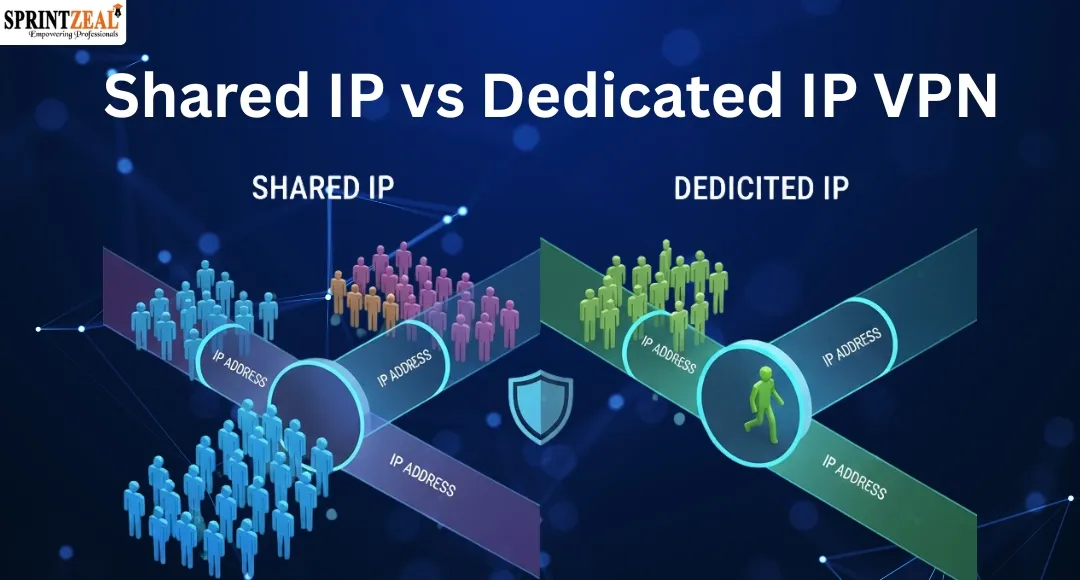
Remote and hybrid teams log in from coffee shops, cloud regions, and home offices every day. Your VPN keeps that traffic safe, yet one decision shapes how smooth each session feels: shared IP vs dedicated IP. A shared pool hides you inside a crowd—but inherits CAPTCHAs and blacklist scars. A dedicated address preserves your reputation, while linking every click back to you. In this guide, we’ll unpack 10 real-world scenarios and a seven-factor decision matrix so you can choose the right IP strategy—fast and with evidence.
Before we dig into the decision matrix, let’s look at a live example. TorGuard’s dedicated-IP dashboard shows the controls you should review any time a vendor promises “static” power.
Picture the admin page: a single toggle assigns a fixed IPv4 address that only your account can reach. Behind that checkbox sit four questions worth answering:
Scope. Is the IP tied to one user, an entire team, or a transferable token? Portability matters when staff rotate on and off projects.
Geography. Some providers offer as few as three cities, while others, Surfshark for instance, list 20 locations across 15 countries (May 2025). Make sure at least one site matches your latency and data-sovereignty needs.
Resilience. Ask how quickly the vendor can swap a “burned” IP. A business-ready plan should let you replace the address in hours, not days, and without extra tickets.
Visibility. Look for per-connection logs that map user, device, and timestamp. That detail calms auditors and cuts forensic work from days to minutes.
Keep this four-point card close. Whether you’re vetting TorGuard, Surfshark, or tomorrow’s newcomer, the same mechanics decide whether a dedicated IP becomes a productivity boost or an expensive sticker on shaky network hygiene.
Technical labels stack up fast. If we don’t pause to decode them, any strategy talk turns into jargon. Here’s the baseline we’ll use for the rest of this guide.
Shared IP: Your traffic leaves through the same address as thousands of other users. That strength-in-numbers anonymity also means you inherit every neighbour’s reputation scars.
Dedicated IP: One stable address belongs only to you. Allow-lists stay tidy, but sessions become linkable across time.
Static IP: The address never changes, yet it might still be shared; “static” promises only immobility.
Rotating IP: The provider swaps you to a new exit every few minutes or requests (many services default to five- to fifteen-minute cycles). This dodges fingerprinting but can break long-lived sessions.
Quick reference:
IP type | Who shares it? | Does it change? | Primary benefit | Primary risk |
Shared | Many users | Yes (per session) | Larger anonymity set | More CAPTCHAs / blocks |
Dedicated | You only | No | Stable reputation, easy allow-listing | Greater linkability |
Static (shared or solo) | Few to many | No | Predictable endpoint | Depends on pool behaviour |
Rotating | Usually you | Yes (timed) | Evades rate limits and fingerprinting | Session instability |
Clear criteria help you rise above gut instinct and vendor hype. We score every IP scenario on the same seven factors, using a 1 to 5 scale (higher numbers show greater business impact).
Privacy and linkability: size of the anonymity set versus ease of tracing repeat sessions.
Access reliability: CAPTCHAs, fraud checks, and outright blocks that drain productivity.
Security-control fit: how neatly the IP type plugs into allow-lists, Conditional Access, and least-privilege design.
Compliance and audit posture: log clarity, jurisdiction risk, and vendor transparency.
Operational overhead: staff time for onboarding, rotation, and incident response.
Architecture alignment (2026): compatibility with your ZTNA or SASE roadmap.
Cost and scalability: per-user versus per-IP economics as your headcount grows.
Keep this grid nearby; it turns a fuzzy debate into a repeatable, data-driven choice you can review each quarter.
Many services still trust networks more than identities, such as an ERP firewall, a cloud database that opens only to known addresses, or a finance portal that loads only after it sees a static range.
When you stay in a shared VPN pool, every new session hands you a fresh address. Someone then updates the allow-list again and again, and most platforms cap the list. Microsoft Entra allows only 50 trusted IP ranges for MFA bypass and 195 named-location objects overall. Churn eats those slots fast and leaves gray zones where a service stays open longer than intended.
A dedicated IP removes that noise. One address fits every rule, the help-desk queue for “can’t reach the DB” tickets shrinks, and engineers spend evenings shipping code instead of hunting firewall typos.
Stability is still a risk. Treat the address like a credential: enforce MFA at the gateway, rotate keys every quarter, and log who enters the tunnel. Pair the IP with device checks so an attacker can’t stroll in with a stolen laptop.
On our seven-point matrix this scenario scores 5/5 for access reliability and security-control fit, 4/5 for lower operational overhead, and 3/5 on privacy. If allow-lists dominate your day, a dedicated IP is the quickest path to fewer headaches.
Identity platforms now blend device health with risk scores, yet most still lean on one perimeter relic: the source IP. In Microsoft Entra ID, admins tag “named locations” so traffic from office ranges sails past extra prompts while everything else faces tougher checks.
Push that policy through a shared VPN pool and the signal wobbles. Today the packet exits in Miami, tomorrow in Madrid; Entra flags the unusual location, kills the token, and triggers an MFA loop no one rehearsed.
A dedicated IP restores predictability. Register a single static address as Corporate VPN, and conditional access stops firing false positives. Named-location limits matter: Entra allows 195 locations overall and only 50 trusted IP ranges for MFA bypass. One address keeps you comfortably below that ceiling.
IP alone isn’t gospel. Pair the static exit with device health and behavioral analytics so a thief with stolen credentials can’t breeze in from home. On our matrix this scenario scores 5/5 for security-control fit and access reliability, 3/5 for privacy, and 4/5 for cost efficiency—one IP often covers the whole workforce.
If conditional-access hiccups flood your help-desk queue, a dedicated IP is the quickest fix that still honors your zero-trust goals.
You know the drill: you run a quick Google search, face a wall of warped letters, and then your bank flags “suspicious activity.” Ten minutes disappear.
The culprit is reputation. Shared VPN exits inherit every neighbour’s history—good, bad, and scripted. When one user scrapes too hard, the IP’s score drops for everyone. Google explains that these warnings pop up because “a different computer using the same IP address may be responsible” and advises asking an administrator to review shared networks.
A dedicated IP gives you a clean slate. Because only your organisation generates traffic, the address builds a steady profile. Captchas fade, SaaS sessions stay alive, and fraud engines stop throwing false alarms. Trend Micro even found that up to 31 percent of captcha-solving gig workers rely on paid VPNs—proof that reputation travels with the exit node.
Trade-offs remain: a fixed IP is easier to track, so anonymity falls. On our matrix this scenario scores 5/5 for access reliability and operational savings and 3/5 for privacy. If “unusual traffic” messages flood your help-desk queue, a dedicated IP is the fastest cure—just monitor its behaviour to keep the slate clean.
Finance teams want to log in, approve a wire, and move on. Shared VPN exits interrupt that flow because many banks blacklist consumer VPN ranges to curb fraud. Windscribe’s knowledge base states that “financial institutions have strict security measures… often blocking a whole range of IPs that they suspect to come from VPNs” and recommends split tunnelling as a workaround.
Server hopping rarely helps; every exit in the pool carries the same stain. Tickets pile up, dashboards time out, and the CFO asks what security “broke.”
A dedicated IP opens the gate. Your organisation controls one address, so reputation steadies and geo-location stays fixed. Bank risk engines tag it as the same office each day, letting approvals glide through and two-factor codes arrive on time.
Caveat: some institutions ban all VPN traffic. In that case, set split tunnelling so banking domains travel over the raw ISP path while everything else stays protected, and document the exception for auditors.
On our matrix this scenario scores 5/5 for business continuity and lower overhead and 3/5 for privacy. Cost varies but is minor compared with a missed payroll run. If finance workflows freeze whenever you connect, a dedicated IP—or disciplined split tunnelling—is the cure.
If you’re a threat-intel analyst, journalist, or competitive researcher, the goal is invisibility, not convenience. A shared IP helps by blending your traffic with thousands of others, creating a larger anonymity set. Comparitech notes that shared pools “make it nearly impossible to link activity back to a single user” as long as the pool stays large and active.
Rotating exits deepen the cover by changing the address every few minutes, yet they add friction—captchas, lower throughput, and the occasional block. In high-stakes work, that tax is worth paying.
A dedicated IP does the opposite. Reusing it builds a behavioural fingerprint, letting ad networks or surveillance tools stitch sessions together over days and expose your probe.
Mitigation checklist (keep it layered but light): shared or rotating pool, isolated browser profiles, disposable VMs, periodic log clearing, and strict separation between research and personal accounts.
Matrix snapshot: 5/5 for privacy, 3/5 for reliability, 1/5 for compliance relevance. When invisibility trumps everything else, stay in the crowd and let the swarm shield you.
Automation never sleeps—marketing scrapers, support bots, nightly analytics jobs. Most providers throttle by source IP, so one reckless neighbour in a shared pool can burn through the limit and trigger 429 errors for everyone. PingOne, for example, caps a single IP at thirty-five percent of the customer’s licensed rate by default.
A dedicated IP puts reputation in your hands. Consistent, well-behaved traffic keeps throttling engines calm; retries fall, logs stay green. The risk shifts to you alone: a runaway script can poison the address quickly. Guard it with circuit breakers, concurrency caps, and alerting.
Matrix snapshot: 5/5 for operational overhead and cost avoidance, 3/5 for privacy, neutral on compliance. If every minute of downtime ripples into revenue, a dedicated IP—plus solid monitoring—pays for itself in one avoided incident.
Compliance shapes every access control. Under the Digital Operational Resilience Act (in force since January 17, 2025), financial entities must log and prove “secure, controllable connectivity.” HIPAA’s Security Rule, section 164.312(b), also requires mechanisms to record and examine system activity.
Shared IPs blur that audit trail; dozens of users on one address turn 9:17 am log lines into guesswork. Forensic timelines stretch, and auditors question who did what.
A dedicated IP tightens the ledger. Map each user or gateway to a fixed address, stream events into your SIEM, and correlation becomes trivial. Regulators still want context, so document why you chose a static exit, schedule a quarterly rotation drill, and archive the provider’s transparency reports alongside your risk register.
Matrix snapshot: 5/5 for compliance posture, 4/5 for operational clarity, and 3/5 for privacy. When auditors drive your roadmap, a dedicated IP is not a perk; it is a control objective.
Some governments treat encryption as contraband. Myanmar’s cybersecurity law, effective January 1, 2025, criminalises “unauthorised VPN use” with fines up to 10 million kyat and six months in jail; it also forces providers to store user data for three years. Similar rules apply in parts of the Gulf, Russia, and Iran.
A dedicated IP concentrates risk. The same address appears each session, making it easy for censors to spot, block, or subpoena. If authorities compel logs, the paper trail points straight to you.
Shared pools dilute that visibility. Hundreds of users leave through one address, and rotating nodes keep the target moving. Takedowns hit a swarm, not a single host. Yet deep-packet inspection and active probing can still fingerprint VPN traffic, so anonymity is relative.
Layered defence is essential: use obfuscated WireGuard or Shadowsocks, keep a fallback transport, and have Tor bridges ready if the clampdown escalates.
Matrix snapshot: 5/5 for privacy concerns, 4/5 for legal-compliance complexity, 2/5 for reliability because connections can vanish without warning. When your team travels through restrictive regions, favour large shared pools, rotate servers often, and keep alternative secure-access options on standby.
Architectures evolve. You may treat legacy VPN as a stop-gap while rolling out Zero Trust Network Access (ZTNA) or folding into a Secure Access Service Edge (SASE) platform. In that model, the IP address is just one signal in a wider confidence score that blends device health, user context, and application posture.
Reality is messier. Old ERP systems still demand IP allow-lists while new SaaS apps plug into ZTNA brokers. During the transition you need both models side by side.
Smart mix: keep a small pool of dedicated addresses for the handful of hard-coded services, and route everything else through shared or rotating exits managed by your SASE vendor. This avoids per-user static fees and still satisfies the firewall rule you can’t rewrite.
A data point backs the trend. The 2025 SSE Adoption Report shows 62 percent of organisations plan to eliminate VPN concentrators as they onboard ZTNA or SSE within 24 months.
Matrix snapshot: dedicated IPs score high for the shrinking slice of legacy gear, while shared exits win for the expanding cloud estate. If your roadmap says “VPN-less” next fiscal year, retire static addresses only after the last hard-coded rule is gone and every workflow passes cleanly through the ZTNA broker. Until then, treat dedicated IPs as life support for yesterday’s infrastructure, not tomorrow’s secure access.
Speed is the metric you feel first. Cloudflare benchmarks show WireGuard delivering up to three-times lower latency and twice the throughput of OpenVPN on identical hardware. Providers have noticed; Mullvad plans to drop OpenVPN on January 15, 2026, after finding that fewer than seven percent of its users still rely on it.
So where does IP choice fit into protocol wars? Shared or dedicated, a slow handshake erases any reputation edge you paid for. Pair a dedicated IP with WireGuard and you get crisp page loads and stable video calls. The same address on an older protocol can choke on bulk transfers.
Watch future-ready extras as well. Some vendors bind your static IP to a key pair instead of a username, and others let you enable dual-stack IPv6 so modern SaaS domains resolve cleanly. Each setting compounds performance and compatibility gains.
Matrix snapshot: high for architecture alignment and lower overhead, neutral on privacy, and a small boost in reliability because faster handshakes cut dropped sessions. If employees judge IT in megabits per second, a dedicated IP on a WireGuard-first provider is the ticket.
A glossy features page is not evidence. Before you route traffic through any VPN, shared or dedicated, you need proof that the provider belongs in your security stack.
Transparency audits. Look for an independent report from a recognised firm. Proton VPN, for instance, publishes annual no-logs audits by Securitum and Deloitte. No audit? Move on.
Logging policy and jurisdiction. Ask where the core servers sit and which court can subpoena them. A true no-logs stance includes a warrant canary or transparency report that lists every legal request and refusal.
Key management. Find out whether your dedicated IP is tied to a username, a revocable token, or a rotating key pair. Tokenised assignment lowers insider risk because admins cannot impersonate staff unnoticed.
Incident drills. A mature vendor replaces a compromised IP in hours, not days, and publishes timelines of past outages.
Quick litmus test for any sales engineer:
Show the most recent third-party audit and the scheduled date of the next one.
Point to the transparency report or warrant canary.
Explain, step by step, how you retire a burned IP without ticket backlogs.
List every jurisdiction where customer traffic or metadata can be accessed.
Summarise the playbook for a mass block-list event.
If the answers stall or stay vague, keep shopping because due diligence today prevents crisis calls tomorrow.
Reserve the address in a test tenant for 24 hours and confirm geo-location.
Add the IP to every SaaS or firewall rule before sharing credentials.
Enforce MFA and device checks at the VPN gateway.
Schedule a quarterly rotation drill; record any gaps in the change log.
Stream connection metadata (user, device, timestamp) into the SIEM with the tag DEDICATED_IP.
Use split tunnelling to route captcha-heavy sites outside the tunnel.
Rotate exit nodes weekly through MDM so users don’t notice; shorten the cycle if block-list hits rise.
Coach browsing hygiene: no bulk scraping from the same node that handles finance approvals.
Monitor external block-lists for your provider’s ranges and set alerts.
Keep an emergency direct-ISP or ZTNA path ready for full-pool blacklists.
Both runbooks share one rule: document every step. Configuration drift is inevitable; written proof keeps posture intact when turnover or audits arrive. Iterate until the clicks feel routine—that’s when security finally works for you, not against you.
No. Privacy depends on how hard it is to link sessions together. A dedicated address is a stable identifier, so it narrows your anonymity set. Shared pools scatter traffic across many users, making correlation tougher—Tom’s Guide highlights this trade-off in its 2025 deep dive on dedicated IPs.
It lowers the odds but never guarantees freedom. Google explains that its “unusual traffic” warning appears when any behaviour from the same IP looks automated. Your solo address avoids neighbour drama, yet aggressive scraping can still trigger a challenge.
Regulators care about auditability. Under DORA, firms must prove who accessed what, when, and from where (in force since January 17, 2025). A dedicated IP shortens that chain; shared pools require extra correlation work.
Often yes. In 2016 the Court of Justice of the EU ruled that dynamic IPs can be personal data if the website owner can reasonably identify the user. Treat any IP as potentially personal and document safeguards accordingly.
Yes. Many providers let you pin a static address to certain profiles while others stay in the shared pool, giving you stable logins for business apps and broader anonymity for research.
Ten scenarios and seven scoring factors can still feel abstract. Choose the archetype below that best matches your organisation, then follow its playbook.
Compliance-first enterprise
Regulators comb every log line. A dedicated IP trims audit friction and keeps allow-lists stable. Pair it with MFA and a 90-day rotation drill.
Ops-friction fighter
Captchas and rate-limit errors top your ticket queue. One dedicated address calms the noise; monitor its reputation and keep a warm backup ready.
Anonymity-first research crew
Safety outweighs convenience. Stay in large, rotating shared pools, isolate browser profiles, and accept the captcha toll as the price of deniability.
Hybrid moderniser
You’re migrating to ZTNA or SASE but still run a legacy app that needs an IP allow-list. Keep one dedicated address for that hold-out, route everything else through shared exits, and retire the static IP once the last firewall rule disappears.
Document the rationale and review it each quarter; detection methods, business needs, and regulations all evolve. With the right archetype in mind, you’ll avoid default settings and turn a mundane network detail into a strategic edge.
Remote and hybrid teams log in from coffee shops, cloud regions, and home offices every day. Your VPN keeps that traffic safe, yet one decision shapes how smooth each session feels: shared IP vs dedicated IP. A shared pool hides you inside a crowd—but inherits CAPTCHAs and blacklist scars. A dedicated address preserves your reputation, while linking every click back to you. In this guide, we’ll unpack 10 real-world scenarios and a seven-factor decision matrix so you can choose the right IP strategy—fast and with evidence.
Before we dig into the decision matrix, let’s look at a live example. TorGuard’s dedicated-IP dashboard shows the controls you should review any time a vendor promises “static” power.
Picture the admin page: a single toggle assigns a fixed IPv4 address that only your account can reach. Behind that checkbox sit four questions worth answering:
Keep this four-point card close. Whether you’re vetting TorGuard, Surfshark, or tomorrow’s newcomer, the same mechanics decide whether a dedicated IP becomes a productivity boost or an expensive sticker on shaky network hygiene.
Technical labels stack up fast. If we don’t pause to decode them, any strategy talk turns into jargon. Here’s the baseline we’ll use for the rest of this guide.
Quick reference:
|
IP type |
Who shares it? |
Does it change? |
Primary benefit |
Primary risk |
|
Shared |
Many users |
Yes (per session) |
Larger anonymity set |
More CAPTCHAs / blocks |
|
Dedicated |
You only |
No |
Stable reputation, easy allow-listing |
Greater linkability |
|
Static (shared or solo) |
Few to many |
No |
Predictable endpoint |
Depends on pool behaviour |
|
Rotating |
Usually you |
Yes (timed) |
Evades rate limits and fingerprinting |
Session instability |
Clear criteria help you rise above gut instinct and vendor hype. We score every IP scenario on the same seven factors, using a 1 to 5 scale (higher numbers show greater business impact).
Keep this grid nearby; it turns a fuzzy debate into a repeatable, data-driven choice you can review each quarter.
Many services still trust networks more than identities, such as an ERP firewall, a cloud database that opens only to known addresses, or a finance portal that loads only after it sees a static range.
When you stay in a shared VPN pool, every new session hands you a fresh address. Someone then updates the allow-list again and again, and most platforms cap the list. Microsoft Entra allows only 50 trusted IP ranges for MFA bypass and 195 named-location objects overall. Churn eats those slots fast and leaves gray zones where a service stays open longer than intended.
A dedicated IP removes that noise. One address fits every rule, the help-desk queue for “can’t reach the DB” tickets shrinks, and engineers spend evenings shipping code instead of hunting firewall typos.
Stability is still a risk. Treat the address like a credential: enforce MFA at the gateway, rotate keys every quarter, and log who enters the tunnel. Pair the IP with device checks so an attacker can’t stroll in with a stolen laptop.
On our seven-point matrix this scenario scores 5/5 for access reliability and security-control fit, 4/5 for lower operational overhead, and 3/5 on privacy. If allow-lists dominate your day, a dedicated IP is the quickest path to fewer headaches.
Identity platforms now blend device health with risk scores, yet most still lean on one perimeter relic: the source IP. In Microsoft Entra ID, admins tag “named locations” so traffic from office ranges sails past extra prompts while everything else faces tougher checks.
Push that policy through a shared VPN pool and the signal wobbles. Today the packet exits in Miami, tomorrow in Madrid; Entra flags the unusual location, kills the token, and triggers an MFA loop no one rehearsed.
A dedicated IP restores predictability. Register a single static address as Corporate VPN, and conditional access stops firing false positives. Named-location limits matter: Entra allows 195 locations overall and only 50 trusted IP ranges for MFA bypass. One address keeps you comfortably below that ceiling.
IP alone isn’t gospel. Pair the static exit with device health and behavioral analytics so a thief with stolen credentials can’t breeze in from home. On our matrix this scenario scores 5/5 for security-control fit and access reliability, 3/5 for privacy, and 4/5 for cost efficiency—one IP often covers the whole workforce.
If conditional-access hiccups flood your help-desk queue, a dedicated IP is the quickest fix that still honors your zero-trust goals.
You know the drill: you run a quick Google search, face a wall of warped letters, and then your bank flags “suspicious activity.” Ten minutes disappear.
The culprit is reputation. Shared VPN exits inherit every neighbour’s history—good, bad, and scripted. When one user scrapes too hard, the IP’s score drops for everyone. Google explains that these warnings pop up because “a different computer using the same IP address may be responsible” and advises asking an administrator to review shared networks.
A dedicated IP gives you a clean slate. Because only your organisation generates traffic, the address builds a steady profile. Captchas fade, SaaS sessions stay alive, and fraud engines stop throwing false alarms. Trend Micro even found that up to 31 percent of captcha-solving gig workers rely on paid VPNs—proof that reputation travels with the exit node.
Trade-offs remain: a fixed IP is easier to track, so anonymity falls. On our matrix this scenario scores 5/5 for access reliability and operational savings and 3/5 for privacy. If “unusual traffic” messages flood your help-desk queue, a dedicated IP is the fastest cure—just monitor its behaviour to keep the slate clean.
Finance teams want to log in, approve a wire, and move on. Shared VPN exits interrupt that flow because many banks blacklist consumer VPN ranges to curb fraud. Windscribe’s knowledge base states that “financial institutions have strict security measures… often blocking a whole range of IPs that they suspect to come from VPNs” and recommends split tunnelling as a workaround.
Server hopping rarely helps; every exit in the pool carries the same stain. Tickets pile up, dashboards time out, and the CFO asks what security “broke.”
A dedicated IP opens the gate. Your organisation controls one address, so reputation steadies and geo-location stays fixed. Bank risk engines tag it as the same office each day, letting approvals glide through and two-factor codes arrive on time.
Caveat: some institutions ban all VPN traffic. In that case, set split tunnelling so banking domains travel over the raw ISP path while everything else stays protected, and document the exception for auditors.
On our matrix this scenario scores 5/5 for business continuity and lower overhead and 3/5 for privacy. Cost varies but is minor compared with a missed payroll run. If finance workflows freeze whenever you connect, a dedicated IP—or disciplined split tunnelling—is the cure.
If you’re a threat-intel analyst, journalist, or competitive researcher, the goal is invisibility, not convenience. A shared IP helps by blending your traffic with thousands of others, creating a larger anonymity set. Comparitech notes that shared pools “make it nearly impossible to link activity back to a single user” as long as the pool stays large and active.
Rotating exits deepen the cover by changing the address every few minutes, yet they add friction—captchas, lower throughput, and the occasional block. In high-stakes work, that tax is worth paying.
A dedicated IP does the opposite. Reusing it builds a behavioural fingerprint, letting ad networks or surveillance tools stitch sessions together over days and expose your probe.
Mitigation checklist (keep it layered but light): shared or rotating pool, isolated browser profiles, disposable VMs, periodic log clearing, and strict separation between research and personal accounts.
Matrix snapshot: 5/5 for privacy, 3/5 for reliability, 1/5 for compliance relevance. When invisibility trumps everything else, stay in the crowd and let the swarm shield you.
Automation never sleeps—marketing scrapers, support bots, nightly analytics jobs. Most providers throttle by source IP, so one reckless neighbour in a shared pool can burn through the limit and trigger 429 errors for everyone. PingOne, for example, caps a single IP at thirty-five percent of the customer’s licensed rate by default.
A dedicated IP puts reputation in your hands. Consistent, well-behaved traffic keeps throttling engines calm; retries fall, logs stay green. The risk shifts to you alone: a runaway script can poison the address quickly. Guard it with circuit breakers, concurrency caps, and alerting.
Matrix snapshot: 5/5 for operational overhead and cost avoidance, 3/5 for privacy, neutral on compliance. If every minute of downtime ripples into revenue, a dedicated IP—plus solid monitoring—pays for itself in one avoided incident.
Compliance shapes every access control. Under the Digital Operational Resilience Act (in force since January 17, 2025), financial entities must log and prove “secure, controllable connectivity.” HIPAA’s Security Rule, section 164.312(b), also requires mechanisms to record and examine system activity.
Shared IPs blur that audit trail; dozens of users on one address turn 9:17 am log lines into guesswork. Forensic timelines stretch, and auditors question who did what.
A dedicated IP tightens the ledger. Map each user or gateway to a fixed address, stream events into your SIEM, and correlation becomes trivial. Regulators still want context, so document why you chose a static exit, schedule a quarterly rotation drill, and archive the provider’s transparency reports alongside your risk register.
Matrix snapshot: 5/5 for compliance posture, 4/5 for operational clarity, and 3/5 for privacy. When auditors drive your roadmap, a dedicated IP is not a perk; it is a control objective.
Some governments treat encryption as contraband. Myanmar’s cybersecurity law, effective January 1, 2025, criminalises “unauthorised VPN use” with fines up to 10 million kyat and six months in jail; it also forces providers to store user data for three years. Similar rules apply in parts of the Gulf, Russia, and Iran.
A dedicated IP concentrates risk. The same address appears each session, making it easy for censors to spot, block, or subpoena. If authorities compel logs, the paper trail points straight to you.
Shared pools dilute that visibility. Hundreds of users leave through one address, and rotating nodes keep the target moving. Takedowns hit a swarm, not a single host. Yet deep-packet inspection and active probing can still fingerprint VPN traffic, so anonymity is relative.
Layered defence is essential: use obfuscated WireGuard or Shadowsocks, keep a fallback transport, and have Tor bridges ready if the clampdown escalates.
Matrix snapshot: 5/5 for privacy concerns, 4/5 for legal-compliance complexity, 2/5 for reliability because connections can vanish without warning. When your team travels through restrictive regions, favour large shared pools, rotate servers often, and keep alternative secure-access options on standby.
Architectures evolve. You may treat legacy VPN as a stop-gap while rolling out Zero Trust Network Access (ZTNA) or folding into a Secure Access Service Edge (SASE) platform. In that model, the IP address is just one signal in a wider confidence score that blends device health, user context, and application posture.
Reality is messier. Old ERP systems still demand IP allow-lists while new SaaS apps plug into ZTNA brokers. During the transition you need both models side by side.
Smart mix: keep a small pool of dedicated addresses for the handful of hard-coded services, and route everything else through shared or rotating exits managed by your SASE vendor. This avoids per-user static fees and still satisfies the firewall rule you can’t rewrite.
A data point backs the trend. The 2025 SSE Adoption Report shows 62 percent of organisations plan to eliminate VPN concentrators as they onboard ZTNA or SSE within 24 months.
Matrix snapshot: dedicated IPs score high for the shrinking slice of legacy gear, while shared exits win for the expanding cloud estate. If your roadmap says “VPN-less” next fiscal year, retire static addresses only after the last hard-coded rule is gone and every workflow passes cleanly through the ZTNA broker. Until then, treat dedicated IPs as life support for yesterday’s infrastructure, not tomorrow’s secure access.
Speed is the metric you feel first. Cloudflare benchmarks show WireGuard delivering up to three-times lower latency and twice the throughput of OpenVPN on identical hardware. Providers have noticed; Mullvad plans to drop OpenVPN on January 15, 2026, after finding that fewer than seven percent of its users still rely on it.
So where does IP choice fit into protocol wars? Shared or dedicated, a slow handshake erases any reputation edge you paid for. Pair a dedicated IP with WireGuard and you get crisp page loads and stable video calls. The same address on an older protocol can choke on bulk transfers.
Watch future-ready extras as well. Some vendors bind your static IP to a key pair instead of a username, and others let you enable dual-stack IPv6 so modern SaaS domains resolve cleanly. Each setting compounds performance and compatibility gains.
Matrix snapshot: high for architecture alignment and lower overhead, neutral on privacy, and a small boost in reliability because faster handshakes cut dropped sessions. If employees judge IT in megabits per second, a dedicated IP on a WireGuard-first provider is the ticket.
A glossy features page is not evidence. Before you route traffic through any VPN, shared or dedicated, you need proof that the provider belongs in your security stack.
Quick litmus test for any sales engineer:
If the answers stall or stay vague, keep shopping because due diligence today prevents crisis calls tomorrow.
Both runbooks share one rule: document every step. Configuration drift is inevitable; written proof keeps posture intact when turnover or audits arrive. Iterate until the clicks feel routine—that’s when security finally works for you, not against you.
No. Privacy depends on how hard it is to link sessions together. A dedicated address is a stable identifier, so it narrows your anonymity set. Shared pools scatter traffic across many users, making correlation tougher—Tom’s Guide highlights this trade-off in its 2025 deep dive on dedicated IPs.
It lowers the odds but never guarantees freedom. Google explains that its “unusual traffic” warning appears when any behaviour from the same IP looks automated. Your solo address avoids neighbour drama, yet aggressive scraping can still trigger a challenge.
Regulators care about auditability. Under DORA, firms must prove who accessed what, when, and from where (in force since January 17, 2025). A dedicated IP shortens that chain; shared pools require extra correlation work.
Often yes. In 2016 the Court of Justice of the EU ruled that dynamic IPs can be personal data if the website owner can reasonably identify the user. Treat any IP as potentially personal and document safeguards accordingly.
Yes. Many providers let you pin a static address to certain profiles while others stay in the shared pool, giving you stable logins for business apps and broader anonymity for research.
Ten scenarios and seven scoring factors can still feel abstract. Choose the archetype below that best matches your organisation, then follow its playbook.
Document the rationale and review it each quarter; detection methods, business needs, and regulations all evolve. With the right archetype in mind, you’ll avoid default settings and turn a mundane network detail into a strategic edge.

Wed, 07 October 2026
Tue, 01 September 2026

Fri, 28 August 2026

Wed, 19 August 2026

Fri, 24 July 2026
Tue, 14 April 2026

Thu, 30 January 2025

Tue, 04 February 2025


© 2026 Sprintzeal Americas Inc. - All Rights Reserved.



 USA : +1315-322-7821
 UK : +44 7700 174870
 IND : +919036108287
 AUS : +61 480 005 455