How to Choose the Right Laptop for Learning Technical Skills
Tue, 01 September 2026

Inspirational journeys
Follow the stories of academics and their research expeditions

Most people assume getting a web application online requires days of complex configuration, waiting for DNS records to propagate, and endlessly troubleshooting SSL errors. It is easy to see why. The gap between a local build working perfectly on your machine and a live, publicly accessible product often feels like a steep mountain to climb. However, this assumption is outdated. When done correctly, taking an app from zero to production fits comfortably inside a single working day.
Deployment is a process that often intimidates non-developers, and even technically minded professionals sometimes lack a clear mental map of how domain registration, hosting, and security certificates connect. Without a logical order of operations, the process can become confusing, leading to avoidable delays and frustrating error messages.
The good news is that launching your app is a highly sequential, learnable process. This guide provides a structured walkthrough of every stage. From choosing the right hosting platform to seeing the secure padlock appear in your browser, you will learn the exact steps needed to get your app live, secure, and ready for users.
Before a single line of code goes live, every deployment journey begins with a domain name search — the process of checking whether your intended web address is available and aligning it with your product's brand. Domain selection is the logical starting point, not an afterthought you tack on at the end of the deployment cycle.
An effective domain name is brief, relevant, and uses an appropriate extension (like .com, .io, or .app) that matches your industry. Checking availability early heavily influences branding decisions. If your first choice is taken, you might need to adjust your app's name or opt for a different extension. Locking in the right name before you start configuring hosting environments saves a significant amount of time and prevents confusion later on.
Once you secure your name, the next step is deciding where your application will live. For general users and semi-technical teams, hosting generally falls into three main categories: traditional shared hosting, cloud platforms, and Virtual Private Servers (VPS).
Traditional shared hosting is highly affordable and often works well for simple static sites or basic content management systems. However, it can lack the specific environment controls needed for modern web applications. Cloud platforms have become incredibly popular for their ease of setup. They often offer automated SSL support, straightforward custom domain compatibility, and integrate directly with your code repositories. Research from Flexera’s annual State of the Cloud report indicates that over 60% of web applications are now deployed on cloud platforms rather than traditional on-premise servers.
Finally, a VPS provides complete control over the server environment. This is ideal for complex backend applications but requires more hands-on configuration. Matching your app type—whether it is a simple static site, a Node.js application, or a Python backend—to the right platform ensures a smoother deployment process.
With your hosting environment ready, you must connect your web address to your server. This happens through the Domain Name System (DNS). If you have not yet secured your web address, you will need to buy a domain before proceeding with DNS configuration — most registrars provide the nameserver details you will need at the point of purchase.
DNS configuration relies on a few primary records. An 'A record' points your domain directly to an IP address, while a 'CNAME' record points your domain to another domain name (often provided by cloud platforms). Nameservers tell the internet which company manages your DNS settings.
When you update these settings, changes must propagate across the global internet. While people often warn that this can take up to 48 hours, modern infrastructure is much faster. Cloudflare documentation and industry research show that DNS propagation completes within 1 hour for about 80% of records. Understanding this timeline helps demystify the most commonly misunderstood step of deployment.
After connecting the domain, you must secure the connection. Secure Sockets Layer (SSL) and Transport Layer Security (TLS) encrypt the traffic between your user's browser and your server, establishing trust and enabling HTTPS.
SSL is no longer optional. Browsers actively penalize non-secure sites with prominent warning screens, and search engines use HTTPS as a ranking signal. The Google Transparency Report confirms that over 95% of pages loaded in Chrome use HTTPS.
Fortunately, modern cloud platforms handle certificate issuance automatically via services like Let's Encrypt. Once your DNS resolves, the platform provides the certificate in the background. If a certificate does not activate immediately, the most common culprit is a misconfigured DNS record. Verifying your settings usually resolves the issue, allowing the secure padlock icon to appear.
Deploying is only finished once you verify that everything functions as intended in the live environment. Local behavior does not always perfectly transfer to a production server. Run through this structured checklist to ensure your app is fully operational:
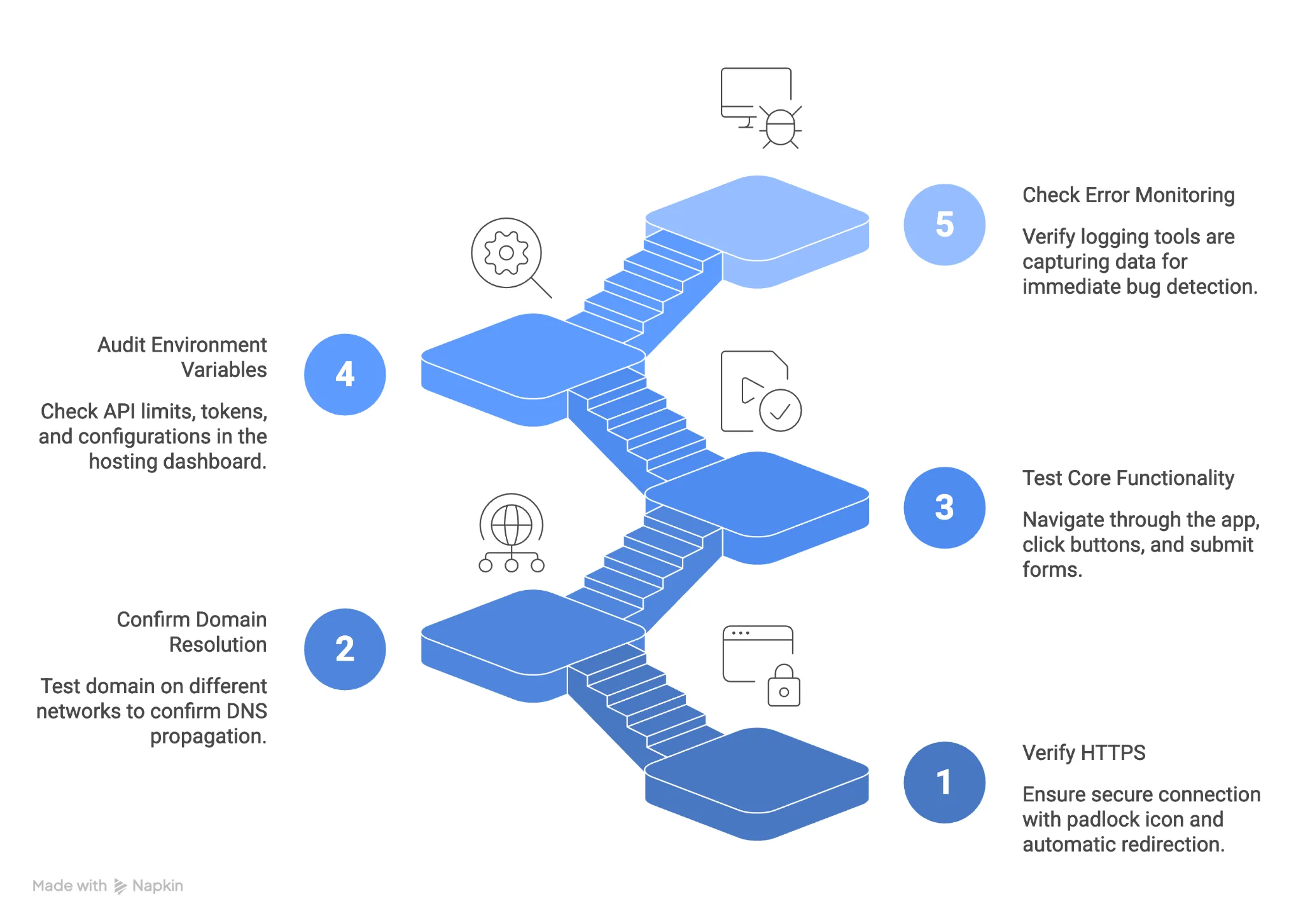
Following this process in order—from branding and hosting to DNS, security, and verification—consistently produces a live, secure app within a single working day.
Deploying an application to production with a custom domain and SSL is a sequential, learnable process. It is not a barrier reserved strictly for seasoned software engineers. By breaking the journey down into logical stages—domain selection, hosting configuration, DNS routing, SSL provisioning, and final testing—you prevent the most common delays and technical headaches. Each stage builds directly on the success of the last.
The next time you are ready to launch an idea, start with the most natural first action. Run your domain name search to lock in your identity, and set the rest of the deployment process into motion.
While standard warnings state propagation can take up to 48 hours, most DNS updates resolve within an hour. Factors affecting this include your Time to Live (TTL) settings, your internet service provider, and the geographic location of the server.
Free SSL certificates, such as those provided by Let's Encrypt, are entirely reliable, secure, and recognized by all major web browsers. Most modern hosting platforms include them automatically at no extra cost.
A domain registrar is where you purchase and manage your web address (your name). A hosting provider is where you rent server space to store your application's files and code (your house). They work together to make your app accessible.
Yes. Cloud platforms have simplified deployment so that anyone can connect a repository, configure a custom domain, and generate an SSL certificate using visual dashboards rather than complex command-line instructions.
First, verify that your DNS records (A record or CNAME) are correctly pointing to your hosting provider. SSL certificates cannot be provisioned until the DNS successfully resolves. If the records are correct, check your platform's dashboard to manually prompt the certificate generation process.

Tue, 01 September 2026
Fri, 28 August 2026

Wed, 19 August 2026

Fri, 24 July 2026
Tue, 14 April 2026

Thu, 30 January 2025

Tue, 04 February 2025

Wed, 29 January 2025


© 2026 Sprintzeal Americas Inc. - All Rights Reserved.


 USA : +1315-322-7821
 UK : +44 7700 174870
 IND : +919036108287
 AUS : +61 480 005 455