Inspirational journeys
Follow the stories of academics and their research expeditions
Top BYOD Security Risks Every Business Should Know
Let’s say you are a mid-level account manager sending a contract draft to a colleague. The one opens it on her laptop, saves it to the desktop so it’s close to hand, then moves on with her afternoon. She doesn’t think to check her sync settings. By evening, that file is sitting in her personal cloud storage – outside company systems, outside IT visibility, outside the data retention policy her organization agreed to. Nothing was stolen. Nobody acted recklessly. The data simply ended up somewhere it was never supposed to be.
That scenario plays out dozens of times a day in organizations that have BYOD programs – formal or informal – without ever having worked out what that actually means for their data security.
Most of the literature on this stops at the policy checklist. The BYOD security best practices 2026 guide from TrustRacer is one of the few that gets into the control architecture behind those policies. But before any of that matters, it's worth being precise about what the actual risk surface looks like.
Let’s be precise about the terms. What is BYOD in cyber security? The acronym BYOD stands for “Bring Your Own Device” – this refers to employees using their personal phones, laptops, and tablets to perform work tasks. What is BYOD security, then? It is the set of policies, controls, and technical measures an organization puts in place to manage that access without creating unacceptable exposure. BYOD is the workplace arrangement. BYOD security is what makes that arrangement viable.
The BYOD industry growth report from Grand View Research indicates that the market continues to expand due to the rise of remote work and the economic benefits of employees using their own devices. But there is one caveat. Plenty of organizations have allowed personal devices for years without a formal risk assessment to show for it.
Table of Contents
- 1. Devices Running Software Nobody Updates
- 2. Authentication That Was Set Up for Personal Use
- 3. Data That Moves Without Anyone Noticing
- 4. Apps That Nobody in IT Has Looked At
- 5. A Much Wider Phishing Surface
- 6. Network Security That Depends on Location
- 7. Lost Devices With No Recovery Plan
- 8. Compliance Exposure That Builds Quietly
- BYOD Risk Overview
- What Organizations Can Do About These Risks
- Where This Leaves Most Organizations
1. Devices Running Software Nobody Updates
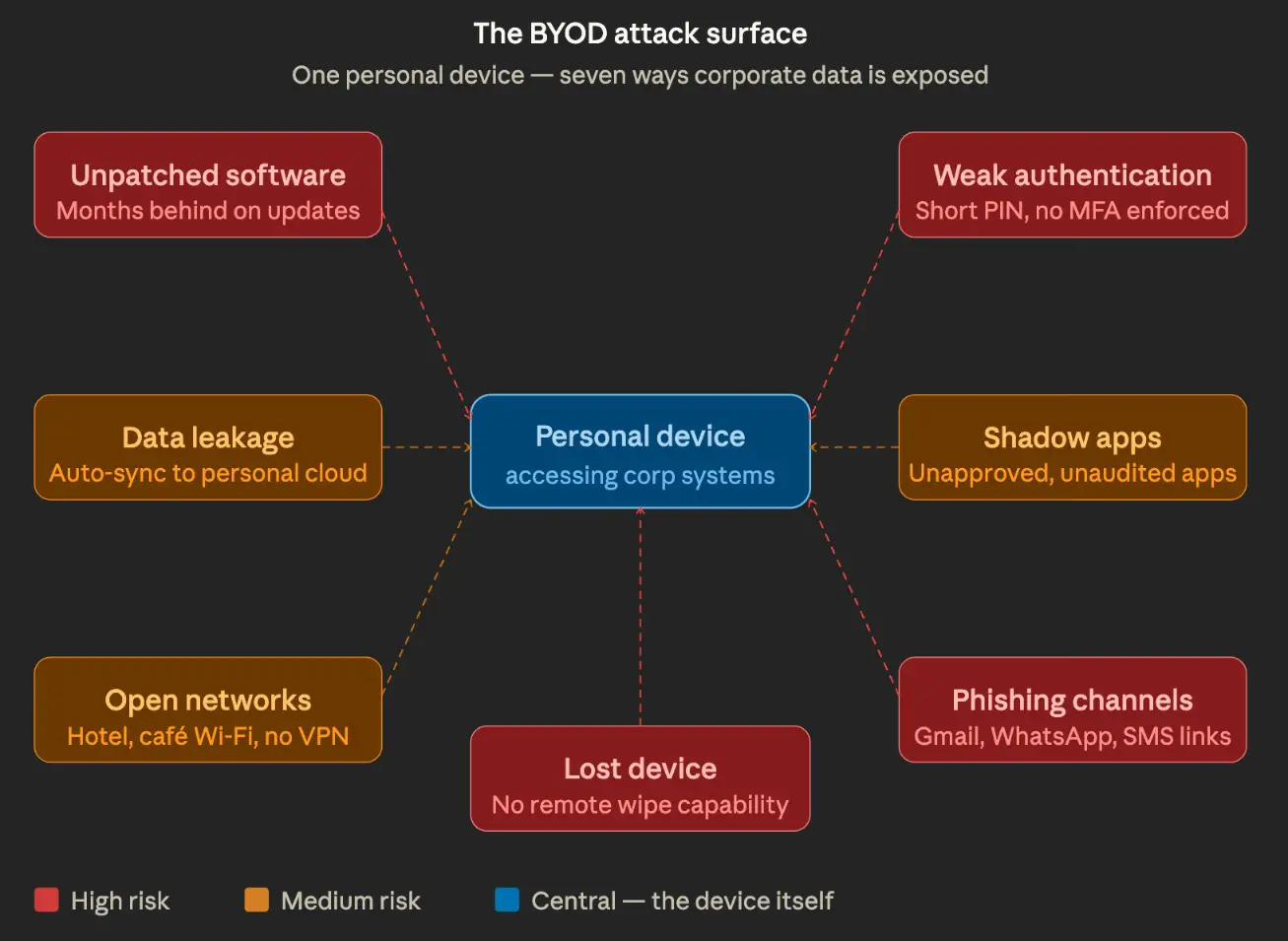
When IT manages hardware, patching gets scheduled and enforced. When employees bring their own devices, that control goes away. People defer updates for ordinary reasons – the device restarts at a bad time, the update notification gets dismissed, or storage is full. Weeks pass, then months.
A laptop sitting three security patches behind is not an abstract BYOD security risk – there are known, accessible tools for compromising it. This applies equally to mobile devices. An employeeєs phone, on a security patch level from over a year ago, used daily to access corporate email, is a genuine exposure point. The fact that the device is personally owned changes nothing about the vulnerability.
2. Authentication That Was Set Up for Personal Use
Most people configure their personal devices for convenience. Short PINs. Pattern locks that leave smudge trails on the screen. Biometrics was set up years ago, possibly not working well anymore. A few devices have no lock screen at all.
When those devices gain access to corporate systems, the authentication gap becomes a direct BYOD security issue. An attacker who gets hold of an unlocked phone – left at a table, picked up after a theft – can walk straight into whatever corporate applications are saved on it. No technical sophistication needed.
Multi-factor authentication makes a real difference here, but it only works if employees are actually required to use it. If business applications support MFA but adoption on personal devices is optional, protection becomes a coin flip. The device most likely to get stolen is the one belonging to whoever skipped the setup.
Shared devices add another layer. A household laptop used by teenagers for school and a parent for work will often have cached credentials and autofill data that are not cleanly separated between uses.
3. Data That Moves Without Anyone Noticing
The account manager scenario from the opening is actually one of the tidier versions of this problem. A file synced to personal storage is at least still in one place. The more common pattern is corporate data spreading across personal messaging apps, personal email, and personal cloud accounts because those channels were simply more convenient at the time.
An employee attaches a work document to a personal WhatsApp message because it was faster than sending a proper link. A spreadsheet gets saved to the personal photo library after being opened on mobile. A screenshot of a confidential dashboard gets shared over iMessage. None of this requires bad intent. It requires only that the path of least resistance run through personal channels.
These BYOD security issues are not about catching wrongdoing. They are about closing gaps that exist because personal devices are designed to make sharing easy – syncing content automatically, treating all files the same, reducing friction at every step. That is good product design. It is a security problem when the files include corporate data.
4. Apps That Nobody in IT Has Looked At
Corporate-issued devices can have application controls. Personal devices do not. Employees install whatever they find useful – productivity tools, communication apps, note-takers, file managers – and those apps get whatever permissions they ask for: access to files, microphone, camera, contacts, network traffic.
Some of these apps have poor security histories. Some are maintained by small teams that patch slowly. A few are actively problematic. The fact is that the IT department has no idea what exactly is installed on the devices, which means that no one is assessing what resources these applications have access to or what risks they pose.
This directly contributes to the growth of “shadow IT,” which BYOD programs typically accelerate. When employees work on personal devices, they usually choose their own software instead of seeking alternatives approved by the IT department. From a security perspective, BYOD means that an unknown set of applications is running on the device, which the IT department cannot verify, in addition to any corporate access that the device also has.
5. A Much Wider Phishing Surface
Corporate devices typically have layered defenses: email gateways, DNS filtering, and endpoint detection. Personal devices have none of that. Every consumer channel the employee uses – personal email, social media notifications, SMS, messaging apps – lands directly, without filtering.
The World Economic Forum cybersecurity outlook consistently identifies phishing and social engineering as leading attack vectors across industries. On personal devices, there is no corporate filter to catch a phishing link before it reaches the employee. A click in personal Gmail costs the organization the same as a click in work email, especially when the phishing attempt was specifically aimed at getting into a corporate account.
The relevant BYOD threat here is not that employees are careless. It is that the attack surface on a personal device is significantly broader than on a corporate one, and that gap is rarely addressed in standard security awareness programs.
6. Network Security That Depends on Location
BYOD network security is harder to control than network security for corporate devices for a basic reason: personal devices go everywhere. Home networks. Hotel Wi-Fi. Coffee shops. Airport terminals.
A home router running on default credentials. A hotel network shared with a few hundred other guests. A coffee shop hotspot that is simply open. These are the conditions under which personal devices regularly reach corporate systems, and none would pass a basic security check.
The problem runs in two directions. A device that picked up malware on one of those networks – at a rented apartment, a coworking space, a hotel – carries that straight into the internal network the next time it connects to office Wi-Fi. And IT has no way to know what the device encountered before it arrived. When there’s no VPN enforced at the device level, corporate traffic on outside connections may be readable to others on the same network. HTTPS protects the content, but connection patterns and session metadata can still give a skilled observer enough to act on.
7. Lost Devices With No Recovery Plan
Devices get lost. Left in taxis, forgotten at airports, taken from bags. On a corporate device, IT can remotely lock or wipe it within minutes of a report. On a personal device, that capability may not exist, or employees may have opted out of enabling it, because full-device wipe also removes their personal photos, messages, and apps.
That tension is one of the harder security issues with BYOD to resolve neatly. Employees have a fair objection to giving their employer the ability to erase everything on a device they own. Organizations have an equally fair concern about what happens to corporate data on a device they cannot recover.
Container-based solutions that separate work and personal data help, because selective wipe can target only the corporate container. But these require planning and employee cooperation. The organizations that discover they lack any remote response capability are usually the ones fielding a call about a missing device right now.
8. Compliance Exposure That Builds Quietly
For organizations subject to data protection regulations – GDPR, HIPAA, PCI-DSS, sector-specific rules – BYOD creates a compliance scope that is easy to miss. When a personal device receives or processes regulated data, it technically becomes part of the compliance perimeter.
Employees do not usually think about this. They think of their personal phone as personal. But if that phone has at any point received a document containing patient data, payment records, or personally identifiable information, the organization may need to demonstrate that adequate controls existed on that device. On personal hardware, that demonstration is genuinely difficult.
This BYOD security risk tends to surface during audits or after incidents, rather than as a proactive discovery. By that point, the gap is already documented.
BYOD Risk Overview
|
Risk |
What it looks like |
|
Unpatched OS/apps |
Known exploits go unaddressed for months – no one enforces update schedules on personal hardware |
|
No MFA |
One stolen or guessed password is enough; no second factor to stop account takeover |
|
Auto cloud sync |
Work files land in a personal Google Drive or iCloud account the moment they are opened on a personal device |
|
Unsafe apps |
Productivity tools installed without IT approval carry permissions and vulnerabilities that no one has audited |
|
Open Wi-Fi use |
Corporate traffic runs over hotel or cafe networks with no VPN enforced at the device level |
|
Lost device, no wipe |
A misplaced phone keeps serving up corporate email and saved credentials to whoever finds it |
|
Phishing via personal channels |
A link clicked in personal Gmail or WhatsApp can compromise the same device used for corporate access |
What Organizations Can Do About These Risks
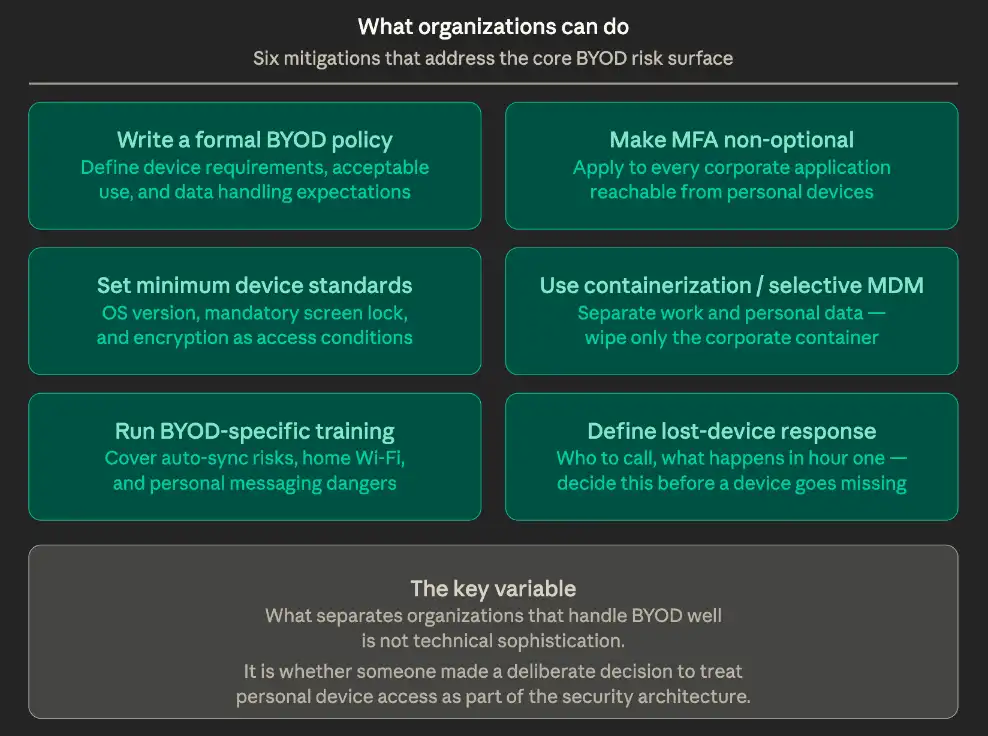
None of this makes BYOD unworkable. Most of these risks have established mitigations, and for many organizations, personal devices are already part of daily operations regardless of whether formal governance exists. The variable is whether that access has been treated as a deliberate security decision or left as an inherited assumption.
The UK’s National Cyber Security Center publishes BYOD guidance covering policy frameworks for different organization sizes. Practically, the measures worth prioritizing:
- Write a formal BYOD policy.
Define device requirements, acceptable use, and what the organization can and cannot do regarding corporate data on personal devices. Without a written policy, expectations are informal, which means inconsistent when it matters. - Make MFA non-optional.
Apply multi-factor authentication to every corporate application accessible from personal devices. If MFA is optional, it will not be in place on the device that gets compromised. - Set minimum device standards.
An OS version requirement, mandatory screen lock, and encryption as a condition of access are not burdensome for employees. They are baseline security hygiene. - Look at containerization or selective MDM.
Solutions that separate corporate data from personal data reduce exposure and resolve the remote wipe conflict – only the corporate container gets cleared, not personal content. - Run training that covers BYOD specifically.
Employees need information that aligns with how they actually use their devices. General training sessions on phishing don’t explain how automatic synchronization works, why home Wi-Fi settings matter, or how personal messages pose risks to data. - Define incident response for lost devices before it happens.
Who does the employee call? What happens in the first hour? Organizations that figure this out in the moment lose time they do not have.
Where This Leaves Most Organizations
The BYOD security risk picture is not complicated, but it is easy to underestimate because none of these risks announces itself. Patching gaps accumulates silently. Data moves through personal channels without generating alerts. Authentication weaknesses sit unused until a device is lost.
What separates organizations that handle BYOD well from those that struggle is rarely the sophistication of their technical stack. It is whether someone made a deliberate decision to treat personal device access as a real part of the security architecture. The BYOD threats covered here do not resolve because they go unacknowledged. They resolve when organizations decide they are worth addressing and build the policy, controls, and training to follow through.

Categories
Related Posts

Ways to Make the Most of a Free Trial Before Paying for a VPN
Mon, 29 June 2026
Top BYOD Security Risks Every Business Should Know
Wed, 29 April 2026

IBM Data Breach: Is IBM Really Breach-Proof?
Tue, 03 December 2024

What Is Secure Access Service Edge (SASE)?
Tue, 15 October 2024

How to Stay Cyber-Secure in Work and Personal Life (Tips and Practices)
Wed, 23 October 2024

Target Cyber Attack: Key Lessons from the 2013 Data Breach
Mon, 09 December 2024

LinkedIn User Data Protection Explained
Tue, 10 December 2024

What Innovative Measures Did Reddit Take to Protect User Data?
Wed, 18 December 2024



 USA : +1315-322-7821
 UK : +44 7700 174870
 IND : +919036108287
 AUS : +61 480 005 455