What Project Managers Should Know About Mobile App Development
Tue, 15 September 2026
Inspirational journeys
Follow the stories of academics and their research expeditions

To organize and monitor progress, a project timeline is a visual depiction of project tasks, their durations, dependencies, and project milestones. Your project's specific steps and length will depend on its nature and scale, but you can use this broad outline as a starting point.
Setting realistic deadlines and updating all project participants on any changes are crucial, though. Throughout the course of the project, project management software can be useful in managing deadlines and resources.
This article will teach you how to set goals for your project, adhere to deadlines, and monitor project progress using your project timetable.
A project timeline is a graphic representation of the order in which project tasks, deadlines, and milestones occurred.
It offers a comprehensive perspective of the project timeline, enabling team members and project managers to monitor progress and spot potential problems.
Task titles, start and end dates, duration, dependencies between tasks, and any milestones or deliverables are often included in a timeline.
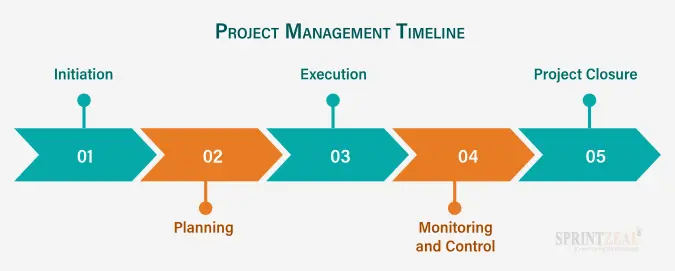
Timelines for projects can be represented in a variety of ways, from straightforward Gantt charts to more intricate software solutions that enable real-time tracking and communication.
Stakeholders may keep track of the project's development and promptly see any potential problems or delays that could harm the project's overall success by using a project timetable. Because of this, project managers can take proactive measures to address these issues and keep the project moving forward.
Project managers and team members can develop, manage, and track project timelines with the aid of project timeline software. These software solutions give the project plan a visual representation, ensuring that everyone involved in the project is on the same page. Gantt charts, a common format for project timeline displays, can be made and shared using project timeline software. Project timeline software may provide more capabilities besides Gantt charts, such as
Resource Administration: Tools for managing team members, equipment, and materials, as well as other project resources
Collaboration: Task assignments, communications, and file sharing are features for communicating with project team members and stakeholders. Tools for time tracking, including timesheet creation, are available.
Time tracking: Tools for tracking time spent on project tasks and creating timesheets.
Reporting: Tools for compiling statistics on how well resources are being used for a project, among other important metrics.
Integration: Integration with other project management tools, such as task management, issue tracking, and project portfolio management software.
Using Bootstrap templates for your admin dashboard can help in creating a seamless interface for managing these integrations, offering a responsive and user-friendly design that works across all devices.
Software for creating project timelines is widely used, and some examples are Microsoft Project, Asana, Trello, Smartsheet, and Wrike. These technologies can aid in the efficient planning, carrying out, and monitoring of projects by project managers, ensuring that projects are finished on schedule, within budget, and to the satisfaction of stakeholders.
Here are some benefits of using online project timeline software:
Improved collaboration: Collaboration is improved since team members can communicate information in actual time, including updates, files, and feedback, thanks to online project timeline software. This ensures that everyone is in agreement and helps foster better communication.
Greater visibility: Online project timeline software gives consumers a greater perspective on the project schedule, making it less difficult to monitor progress, identify potential problems, and make the necessary modifications. Thus, it makes it easier to continue with the project's course and keep all relevant parties informed on its advancement.
Scalability: Online project timeline tools are sufficiently adaptable to be tailored to the needs of projects of any complexity or size. It is a useful tool for managing portfolios since it can be employed to manage multiple projects simultaneously.
Data analysis: Online project timeline software provides beneficial details that can be used to assess the achievement of a project, spot trends, and come to data-driven judgments. Future project planning and execution could profit from this.
In the end, online project timeline software may help project managers properly plan, conduct, and evaluate their projects, ensuring that they finish on time, within budgetary constraints, and to the delight of stakeholders.
Here is one of the simple project timeline examples using a Gantt chart format:
Task 1: Project Initiation
Duration: 2 weeks
Start Date: May 1, 2023
End Date: May 14, 2023
Task 2: Project Planning
Duration: 4 weeks
Start Date: May 15, 2023
End Date: June 11, 2023
Task 3: Resource Allocation
Duration: 1 week
Start Date: June 12, 2023
End Date: June 18, 2023
Task 4: Design and Development
Duration: 10 weeks
Start Date: June 19, 2023
End Date: August 27, 2023
Task 5: Testing and Quality Assurance
Duration: 2 weeks
Start Date: August 28, 2023
End Date: September 10, 2023
Task 6: Deployment
Duration: 1 week
Start Date: September 11, 2023
End Date: September 17, 2023
Task 7: Project Closure
Duration: 1 week
Start Date: September 18, 2023
End Date: September 24, 2023
This timeline shows the sequence of events, their lengths, beginning and ending dates, and more. Tasks 2 through 5 make up the project's critical path, which is the longest series of jobs that must be finished by the project deadline. This period of time may be used to monitor the project's progress and ensure that it continues to go forward on schedule.

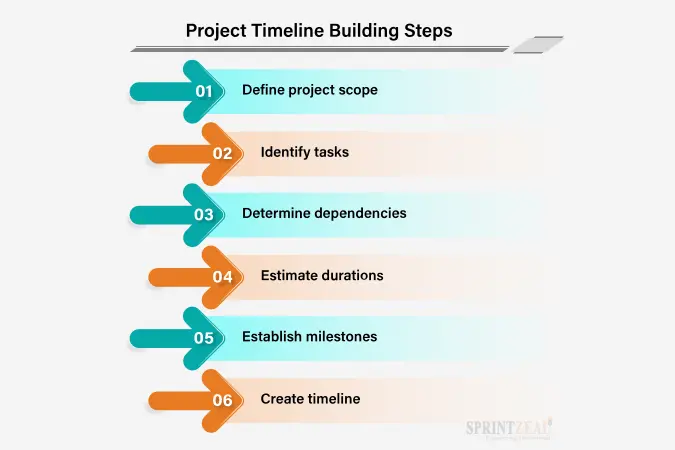
Building a project timeline requires careful planning, attention to detail, and effective communication with team members and stakeholders. By following these steps, you can create a timeline that accurately reflects the project plan and helps ensure project success.
Define the project's scope, goals, and objectives: This process involves identifying the project's objectives, targets, and compatibility with the mission of your company.
Plan your project: Develop a comprehensive project schedule that includes a list of tasks, dates for project completion, and milestones. Make sure to take into consideration any dependencies, risks, and constraints that could impede the project's progress. Take advantage of a Work Breakdown Structure (WBS) to break down the project into more manageable parts.
Identify and allocate resources: This phase involves figuring out the resources needed to finish.
Create processes to facilitate interaction and reporting: Establish a system to interact with project team members, stakeholders, and sponsors. Create task dependencies and define the links between tasks. Employee digital signage displays can be used to showcase task progress and upcoming deadlines in real time. Establish regular meetings and reporting techniques to keep everyone updated on the current state of the project.
Follow up on the project plan: Start executing the project plan by achieving the tasks and milestones that have been defined. Evaluate progress and implement suitable modifications to the plan.
Control and monitor project progress: This phase involves monitoring the progress of the work, recognizing any issues, and implementing remedial action if necessary to maintain the project on timetable. Use the Gantt chart or other project management software to create a timeline. According to feedback and changes, adjust the period of time as necessary.
Finish the project: In order to make sure the project keeps going on track and that tasks are done on time and within budget, the timetable should be continuously monitored and updated. Close down the project by documenting lessons learned, conducting a final review, and transferring any necessary deliverables to the appropriate parties.
Given the project's complexity, the resources at hand, and other factors, the duration of every phase will vary.
Follow these project timeline best practices to create an efficient project management timeline:
Through doing this, you can make certain that your project stays on obviously, that tasks are completed promptly and reasonably, and that everyone in the group is informed of the project's status and timeline.
The project's schedule is usually developed by project managers working with the project team. Project schedules will continue to be a vital tool for efficient project management in 2023. Besides providing a clear picture of the way the project is going, they additionally assist in spotting possible problems, optimizing resource allocation, and promoting team member engagement and communication. Planning, executing, and monitoring projects can all be done in a systematic way using project management.
Getting a PMP certification can be helpful for anyone looking for better project outcomes and to advance their career prospects. Sprintzeal’s PMP Certification Training Course for the project management field is offered by PMI, the Project Management Institute.
Find the certification that will help your career by exploring the additional career-making courses Sprintzeal offers. Chat with our course specialist to obtain complete information about courses or for queries, and our support team will get back to you.
How do you write a project timeline for a project?
To build an extensive project timeline, identify tasks, calculate time, order tasks, assign resources, establish due dates, and track progress.
What four elements should be in a project timeline?
A project schedule ought to contain tasks, time projections, dependencies, and goals.
What should be on a project timeline?
Project tasks, their lengths, dependencies, resources, achievements, deadlines, and performance-tracking tools should all be included in a project schedule.

Tue, 15 September 2026
Mon, 03 August 2026
Tue, 21 July 2026

Mon, 06 July 2026

Wed, 28 August 2024

Tue, 28 April 2026

Tue, 04 August 2026

Mon, 23 September 2024

Tue, 04 August 2026

Sat, 05 September 2026


© 2026 Sprintzeal Americas Inc. - All Rights Reserved.

 USA : +1315-322-7821
 UK : +44 7700 174870
 IND : +919036108287
 AUS : +61 480 005 455